

Custom Posts
เราใช้ฟิลด์ customPost และ customPosts เพื่อดึงข้อมูล CPT ทั้งสำหรับ CPT ที่ถูก map ไปยัง schema แล้ว (เช่น Post และ Page) และที่ยังไม่ได้ map (เช่น CPT จากปลั๊กอินบางตัว) เนื่องจากผลลัพธ์อาจมี entity จากหลายประเภท ฟิลด์เหล่านี้จึงคืนค่าประเภท CustomPostUnion
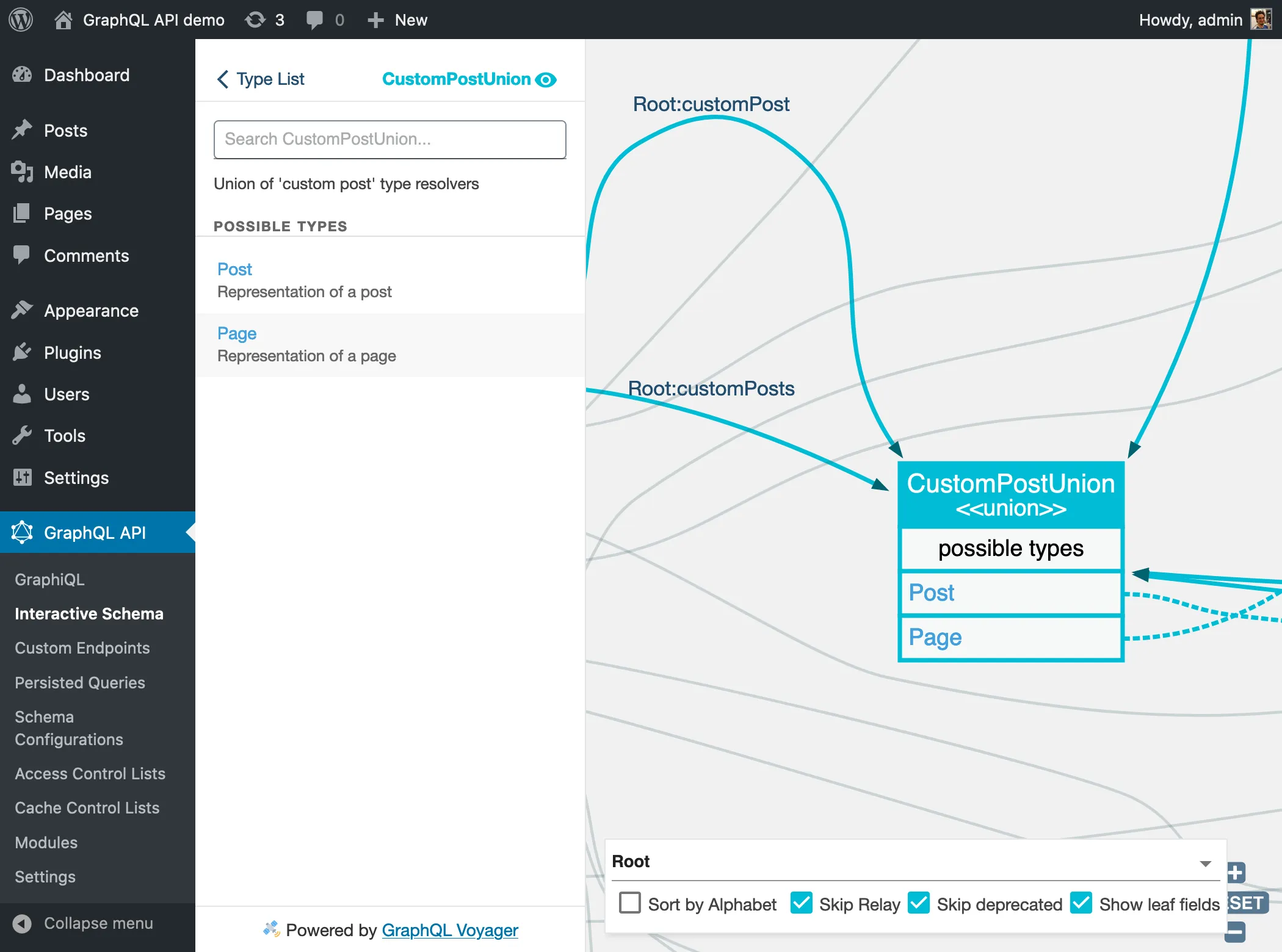
ฟิลด์ Custom Post ใน schema
Gato GraphQL แยกแยะอย่างชัดเจนว่าเมื่อใด custom post คือ "custom post" และไม่ใช่ "post" โดยตรง
ตัวอย่างเช่น comment สามารถเพิ่มไปยัง post ได้ แต่ยังสามารถเพิ่มไปยัง page และ CPT ได้ด้วย ดังนั้น type Comment จึงมีฟิลด์ customPost: CustomPostUnion! เพื่อดึง entity ที่ comment ถูกเพิ่มเข้าไป แทนฟิลด์ post: Post!
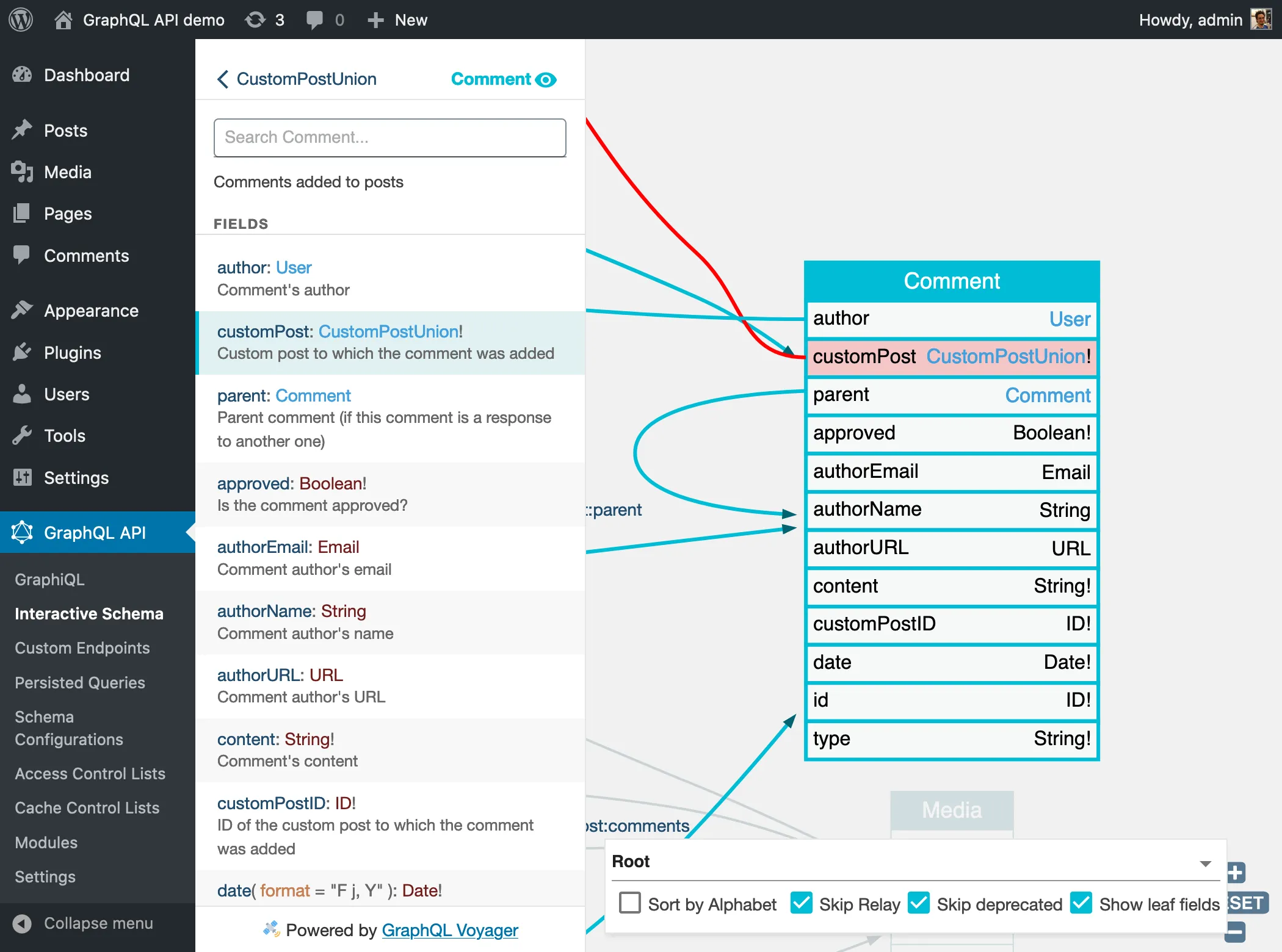
นั่นคือเหตุผลที่ฟิลด์ customPosts รับ argument customPostTypes แทน postTypes
CPT ที่ถูก map ไปยัง schema
มี CPT บางประเภทที่ถูก map ไปยัง schema แล้ว (เช่น Post และ Page ที่แทน CPT "post" และ "page") ในกรณีนี้ query จะถูก resolve โดยใช้ GraphQL type ที่สอดคล้องกับ CPT นั้น
เมื่อดึงผลลัพธ์จาก union type เราต้องระบุฟิลด์ที่ต้องการดึงผ่าน fragment ซึ่งสามารถ evaluate บน interface CustomPost ที่ CPT type ทุกตัว implement อยู่ หรือบน type แต่ละตัว เช่น Post หรือ Page
ใน query ด้านล่าง เราดึง custom post ที่มี CPT "post" และ "page" โดยแสดงฟิลด์ผ่าน 3 fragment ที่ evaluate ว่า entity implement CustomPost หรือเป็น type Post หรือ Page:
query {
customPosts(filter: { customPostTypes: ["post", "page"] }) {
...CustomPostProps
...PostProps
...PageProps
}
}
fragment CustomPostProps on CustomPost {
__typename
title
excerpt
url
dateStr(format: "d/m/Y")
}
fragment PostProps on Post {
tags {
id
name
}
}
fragment PageProps on Page {
author {
id
name
}
}CPT ที่ยังไม่ได้ map ไปยัง schema
เมื่อ CPT ยังไม่ได้ถูก map ไปยัง schema (เช่น "attachment", "revision" หรือ "nav_menu_item" หรือ CPT ใดๆ ที่ติดตั้งโดยปลั๊กอิน) เราก็ยังคงใช้ฟิลด์ customPost และ customPosts และต้องส่งชื่อ CPT ที่สอดคล้องกันใน field argument filter.customPostTypes
เนื่องจาก type เหล่านี้ไม่มีอยู่ใน schema ข้อมูลจะถูกดึงผ่าน type GenericCustomPost ซึ่งมี property ที่เป็นร่วมกับ CPT ทุกตัว (title, content, excerpt, date เป็นต้น)
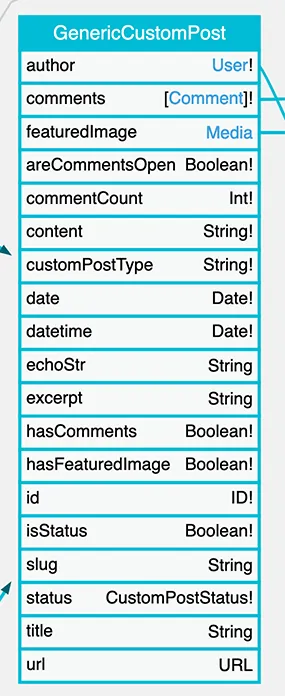
ใน query ด้านล่าง เราดึง custom post สำหรับ CPT หลายประเภท:
query {
customPosts(
filter:{
customPostTypes: [
"page",
"nav_menu_item",
"wp_block",
"wp_global_styles"
]
}
) {
... on CustomPost {
id
title
customPostType
status
}
__typename
}
}การอนุญาตการเข้าถึง Custom Post Types
CPT จะต้องได้รับการอนุญาตอย่างชัดเจนให้สามารถ query ได้ ตามที่อธิบายในคู่มือ การอนุญาตการเข้าถึง Custom Post Types
การ query custom post
GraphQL type สำหรับ CPT ที่ถูก map ไปยัง schema แล้ว (เช่น "post" => Post และ "page" => Page) จะถูกรวมเข้าไปใน CustomPostUnion โดยตรง
สำหรับ CPT ใดๆ ที่ยังไม่ได้ถูก model ไว้ใน schema (เช่น "attachment", "revision" หรือ "nav_menu_item" หรือ CPT ใดๆ ที่ติดตั้งโดยปลั๊กอิน) ข้อมูลจะถูกเข้าถึงผ่าน type GenericCustomPost
เราระบุ CPT ที่ต้องการดึงผ่าน field argument filter.customPostTypes ซึ่งรับรายการของ string โดยใช้ชื่อ CPT ตามที่นิยามไว้ใน WordPress (เช่น "post", "page" เป็นต้น) ตัวอย่างเช่น:
query {
customPosts(
filter: { customPostTypes: ["some-custom-cpt"] }
) {
... on CustomPost {
id
title
}
}
}Query นี้ดึง entry จากหลาย CPT:
query {
customPosts(
filter: {
customPostTypes: [
"post",
"page",
"attachment",
"nav_menu_item",
"custom_css",
"revision"
],
status: [
publish,
inherit,
auto_draft
]
}
) {
id
title
content
status
customPostType
__typename
}
}เนื่องจาก Custom Post ทุกตัว implement interface CustomPost เราจึงสามารถดึงข้อมูลจาก CustomPostUnion โดยใช้ fragment reference หรือ inline fragment:
query {
comments {
id
date
content
customPost {
__typename
...on CustomPost {
id
title
url
}
}
}
}หากเราทราบว่า comment ถูกเพิ่มไปยัง post เราก็สามารถ query ฟิลด์ที่เฉพาะสำหรับ Post ได้เช่นกัน:
query {
comments {
id
date
content
customPost {
__typename
...on CustomPost {
id
title
url
}
...on Post {
categoryNames
}
}
}
}การกรอง CPT ด้วย custom taxonomy
custom post type สามารถมี custom taxonomy (tags และ categories) ที่เชื่อมโยงกัน ตัวอย่างเช่น CPT "product" อาจมี category taxonomy "product-cat" และ tag taxonomy "product-tag" ที่เชื่อมโยงอยู่
เราสามารถกรองผลลัพธ์ด้วย taxonomy ที่เชื่อมโยงเหล่านี้ ผ่าน input tags และ categories ใน filter input
ใน query ด้านล่าง เราดึง custom post โดยกรองตาม category:
query {
customPosts(
filter: {
categories: {
includeBy: {
ids: [26, 28]
}
taxonomy: "product-cat"
}
}
) {
... on CustomPost {
id
title
}
... on GenericCustomPost {
categories(taxonomy: "product-cat") {
id
}
}
}
}การดึงข้อมูล CPT แบบกำหนดเอง
เมื่อใช้ GenericCustomPost เราสามารถขอเฉพาะฟิลด์ที่เป็นร่วมกับ CPT ทุกตัว การดึงข้อมูลแบบกำหนดเองจาก CPT บางตัวไม่รองรับ (เช่น การดึงข้อมูลราคาสำหรับ CPT "product" แบบกำหนดเอง)
ในการดึงข้อมูล CPT แบบกำหนดเอง เราต้องสร้าง resolver ที่สอดคล้องกันในโค้ด PHP เพื่อ map CPT ไปยัง schema:
- สร้าง type
Product - แนบฟิลด์
priceเข้าไป
ตอนนี้ type CustomPostUnion (ที่คืนค่าโดย Root.customPosts) จะ resolve entry ทั้งหมดจาก CPT นี้ไปเป็น type Product
query {
customPosts(
filter: {
customPostTypes: "product"
}
) {
__typename
...on CustomPost { # interface implemented by all CPT types
id
title
customPostType
status
}
...on Product { # custom CPT type
price # custom field
}
}
}นอกจากนี้เรายังสามารถสร้างฟิลด์ Root.products: [Product!] และใช้โดยตรงได้:
query {
products {
__typename # Product
id
title
status
price # custom field
}
}การ mutate ข้อมูล CPT แบบกำหนดเอง
สำหรับ CPT ที่ไม่ต้องการฟิลด์เพิ่มเติมนอกเหนือจากฟิลด์ของ type Post คุณสามารถใช้ทั้ง mutation createCustomPost และ updateCustomPost ได้อย่างอิสระ
ตัวอย่างเช่น CPT MyPortfolio ที่ใช้ฟิลด์มาตรฐาน title และ content และไม่มีฟิลด์เพิ่มเติม สามารถจัดการได้อย่างสมบูรณ์ผ่าน mutation เหล่านี้
Query นี้สร้าง entry สำหรับ CPT "my-portfolio":
mutation {
createCustomPost(
input: {
customPostType: "my-portfolio"
title: "My photograph"
contentAs: { html: "This is my photo, check it out." }
}
) {
status
errors {
__typename
...on ErrorPayload {
message
}
...on GenericErrorPayload {
code
}
}
customPost {
__typename
...on CustomPost {
id
title
content
}
}
}
}Query นี้อัปเดต title และ content สำหรับ CPT เดียวกัน:
mutation {
updateCustomPost(input: {
id: 1
customPostType: "my-portfolio"
title: "Updated title"
contentAs: { html: "Updated content" }
}) {
status
errors {
__typename
...on ErrorPayload {
message
}
}
customPost {
__typename
...on CustomPost {
id
title
content
}
}
}
}custom post type ที่ให้มาโดยปลั๊กอินของบุคคลที่สามอาจต้องสร้าง (และอาจอัปเดต) โดยปลั๊กอินที่สอดคล้องกันเท่านั้น
เนื่องจากอาจมีข้อมูลแบบกำหนดเอง (ใน wp_postmeta หรือในตารางเฉพาะ) ที่ต้องเพิ่มด้วย และ Gato GraphQL ไม่รับรู้ข้อมูลเหล่านั้น
ในการจัดการ CPT เหล่านี้อย่างเหมาะสม ต้องสร้าง integration ที่สอดคล้องกันระหว่างปลั๊กอินนั้นกับ Gato GraphQL เพื่อให้การ map สำหรับฟิลด์ทั้งหมดของ CPT
ตัวอย่างเช่น เราสามารถใช้ฟิลด์ Root.updateCustomPost เพื่อแปลและอัปเดต title และ content ของ WooCommerce product (กล่าวคือ จาก Product CPT) อย่างไรก็ตาม เราไม่สามารถสร้าง WooCommerce product ได้ สำหรับสิ่งนั้น เราต้องใช้ extension "WooCommerce for Gato GraphQL" ที่สอดคล้องกัน