

การทำงานอัตโนมัติ
รัน GraphQL Persisted Query โดยอัตโนมัติเมื่อเกิดเหตุการณ์บางอย่างบนเว็บไซต์
สร้างระบบอัตโนมัติได้โดยตรงผ่าน WordPress editor ทริกเกอร์ของระบบอัตโนมัติคือ WordPress action hook ใดก็ได้ และ action คือการรัน GraphQL persisted query
การเข้าถึง Automation Rules ทั้งหมด
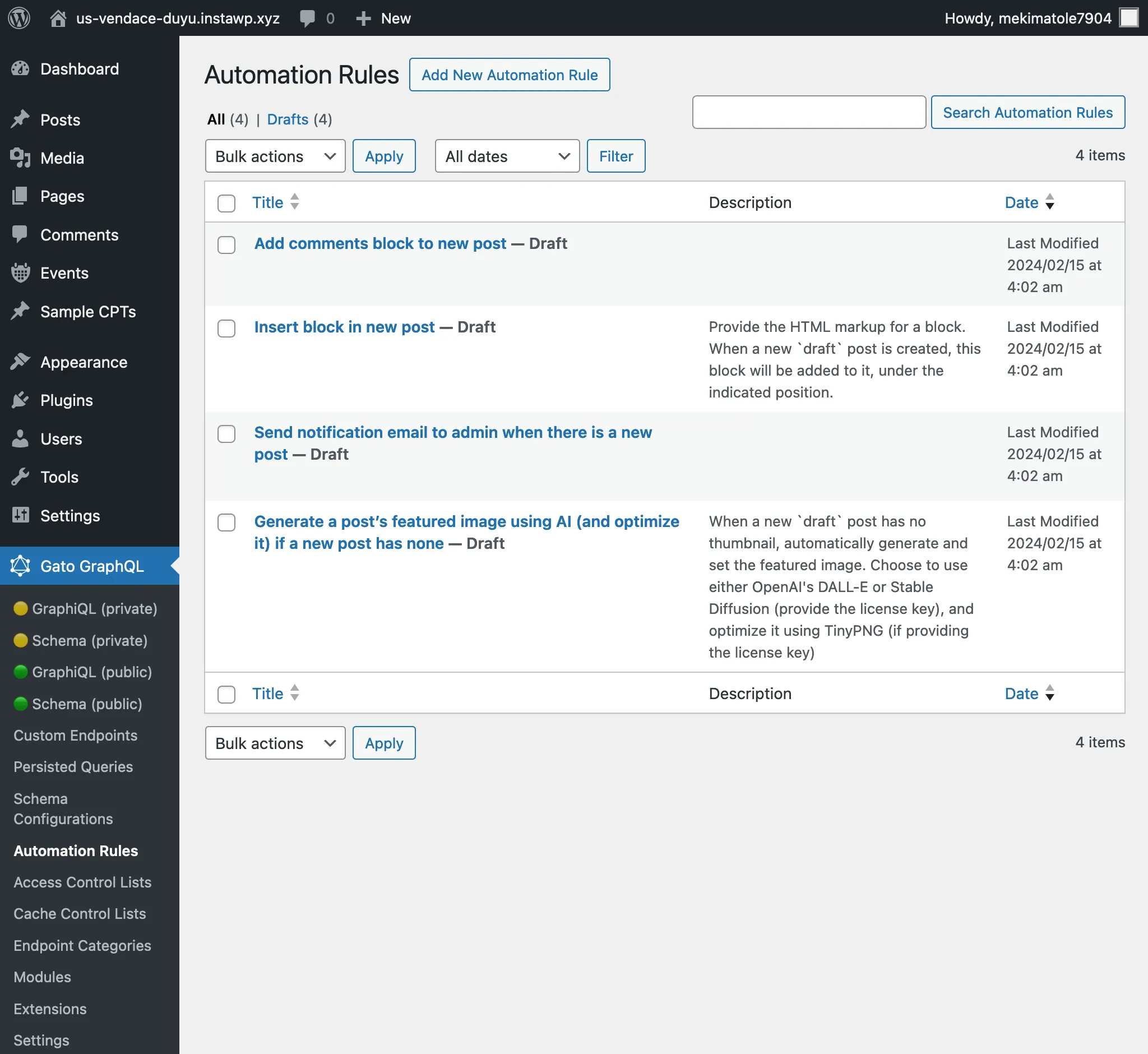
คลิกที่ "Automation Rules" ในเมนูของปลั๊กอิน เพื่อดูรายการ automation rules ที่สร้างไว้ทั้งหมด:
การสร้าง Automation Rule ใหม่
คลิกที่ "Add New Automation Rule" เพื่อเพิ่มรายการใหม่
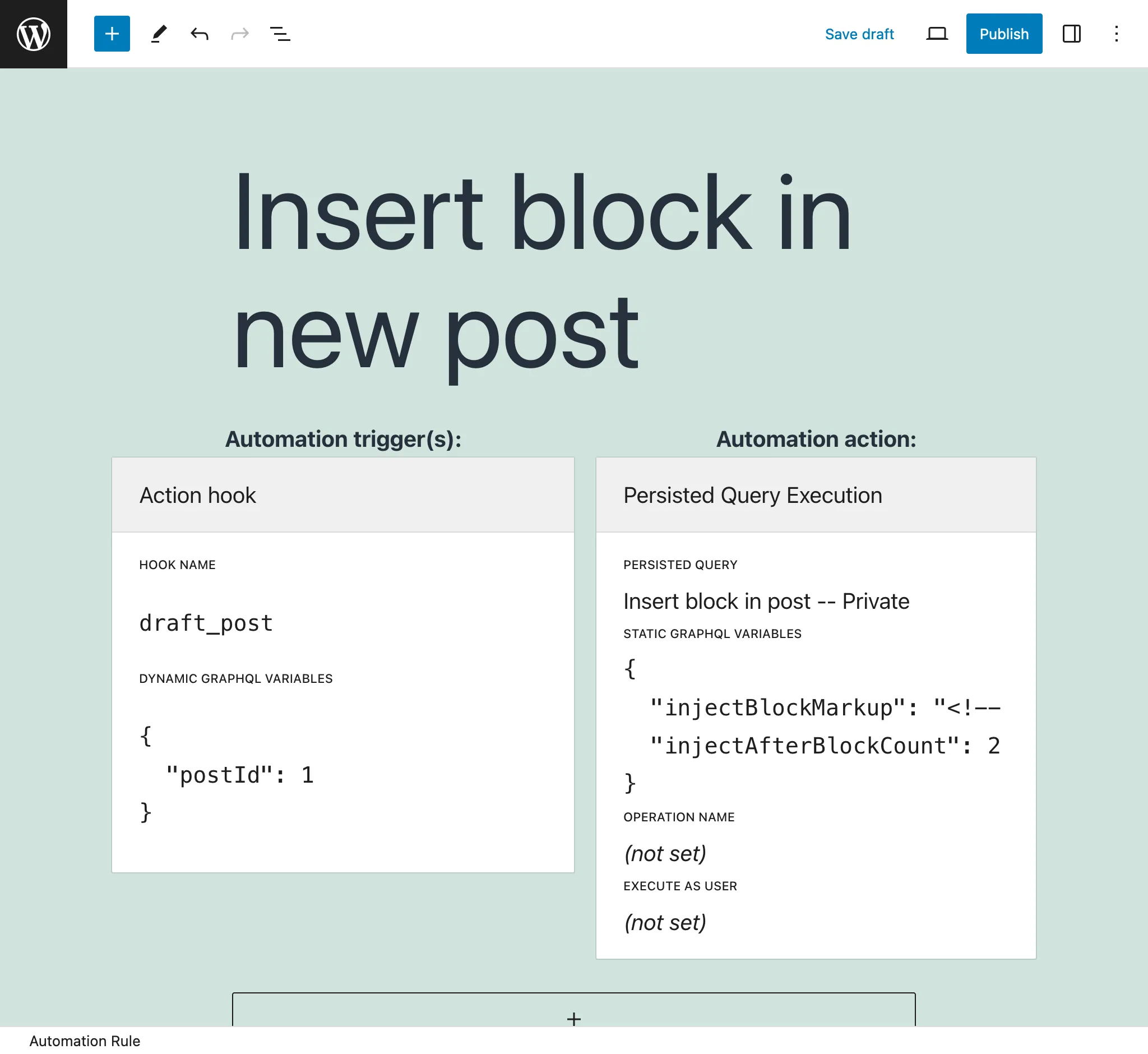
ในหน้าจอ editor เราต้องกำหนดค่าสำหรับ:
- Automation trigger(s)
- Automation action
Automation action
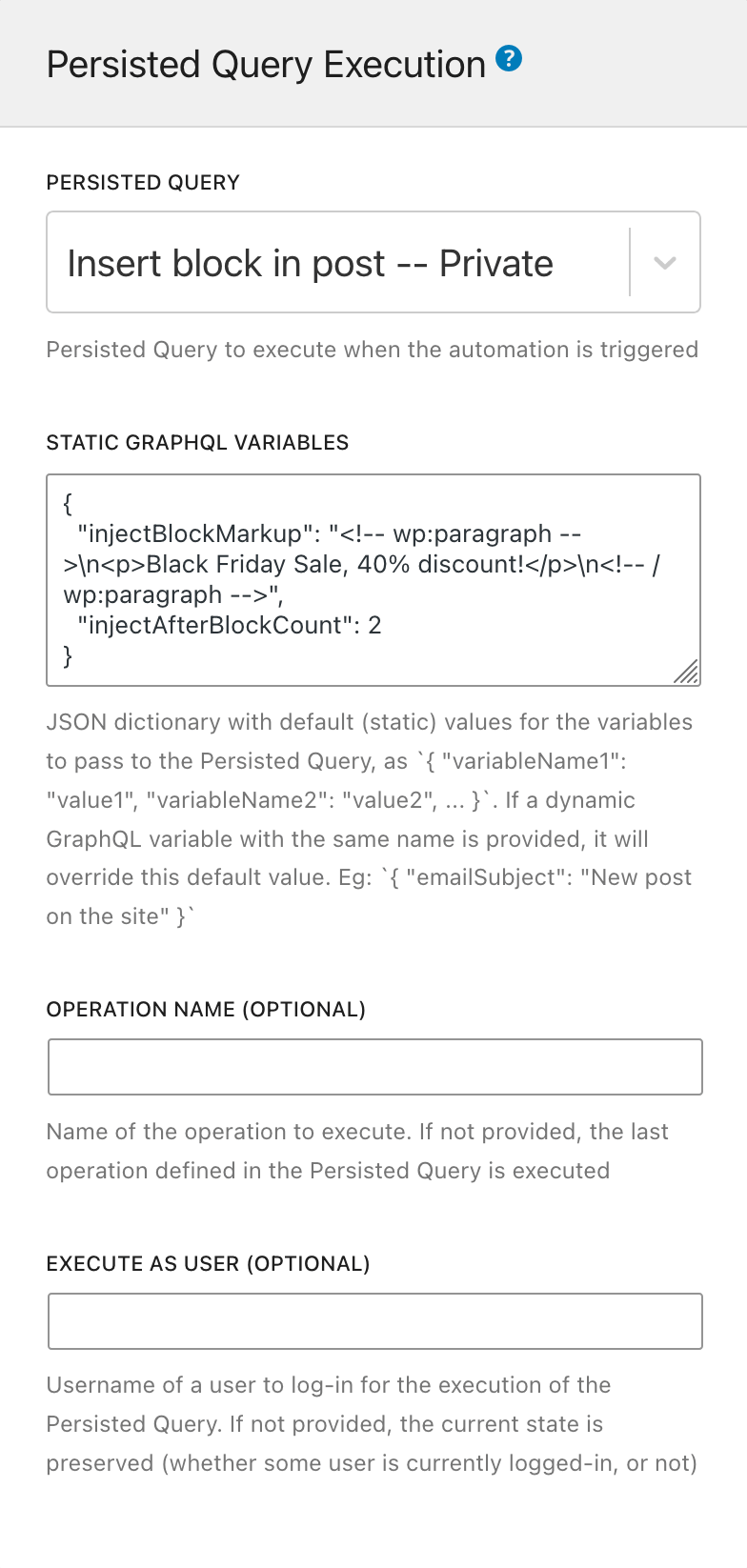
Automation action ระบุว่า GraphQL persisted query ใดจะถูกรัน
กำหนดค่ารายการนี้ด้วยองค์ประกอบต่อไปนี้:
Persisted Query: เลือก GraphQL persisted query ที่จะรัน (จากรายการที่มีสถานะ publish หรือ private)
Static GraphQL Variables: ระบุ JSON string พร้อมค่าสำหรับ GraphQL variables ใน persisted query ค่าเหล่านี้เป็นค่าคงที่
ตัวอย่างเช่น:
{
"emailSubject": "New post on the site"
}ค่าเหล่านี้จะถูกแทนที่ด้วย GraphQL variables แบบ "ไดนามิก" (ดู Automation trigger(s) ด้านล่าง)
Operation name (ไม่บังคับ): หาก persisted query มีมากกว่าหนึ่ง operation คุณสามารถระบุได้ว่าจะรัน operation ใด (ค่าเริ่มต้นคือ operation สุดท้าย)
Execute as user (ไม่บังคับ): รัน GraphQL persisted query โดยล็อกอินเป็นผู้ใช้ที่ระบุ โดยระบุ user slug
Automation trigger(s)
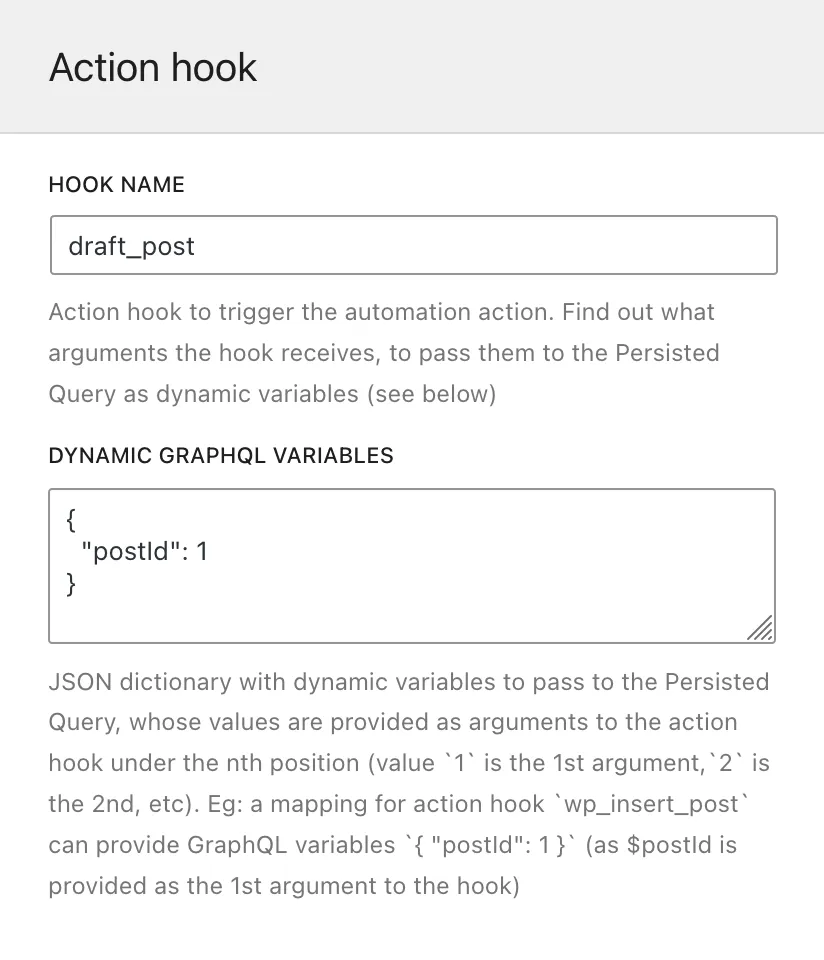
Automation trigger ระบุว่า WordPress action hook ใดจะทริกเกอร์การรัน Persisted Query เราสามารถระบุได้มากกว่าหนึ่ง (เช่น หากต้องการตอบสนองต่อการแก้ไข post หรือ page เท่านั้น เราสามารถระบุ hooks edit_post_post และ edit_post_page ได้)
กำหนดค่ารายการนี้ด้วยองค์ประกอบต่อไปนี้:
Hook name: ชื่อ WordPress action hook
Dynamic GraphQL Variables: ระบุ JSON string ที่แมป GraphQL variables กับ arguments ที่ส่งมายัง hook function ค่าไดนามิกเหล่านี้จะถูกส่งไปยัง query ในขณะ runtime
JSON dictionary ต้องมีชื่อ GraphQL variable เป็น key และตำแหน่งของ argument ใน action hook เป็น value
ตัวอย่างเช่น hook draft_post (จาก post status transitions) ส่ง $post_id เป็น argument แรก ดังนั้น JSON ต่อไปนี้ระบุว่า GraphQL variable $postID จะรับค่าของ $post_id ที่ส่งมายัง hook:
{
"postID": 1
}(ในตัวอย่างนี้ 1 หมายถึง "ค่าของ argument ที่ 1 จาก draft_post")
หากใช้ key เดียวกันสำหรับ GraphQL variables แบบ "ไดนามิก" และ "คงที่" (ดู Automation action ด้านบน) ค่าไดนามิกจะมีความสำคัญกว่า
การแมป WordPress hook
มี WordPress hooks บางตัวที่ไม่สามารถใช้งานได้โดยตรงใน Automation Configurator เนื่องจาก hooks เหล่านี้ส่ง PHP object ผ่าน hook ซึ่งไม่สามารถป้อนเป็น GraphQL variable ได้
Gato GraphQL ได้แมป hooks เหล่านี้หลายตัว โดยการทริกเกอร์ hook ใหม่ที่มีคำนำหน้า gatographql: และชื่อ hook เดิม พร้อมส่ง ID ของ object ที่เกี่ยวข้องเป็นตัวแปร ซึ่งสามารถป้อนเป็น GraphQL variable ได้
ตัวอย่างเช่น WordPress hook draft_to_publish ส่ง $post เป็นตัวแปร (ชนิด WP_Post) Gato GraphQL แมป hook นี้เป็น gatographql:draft_to_publish และส่ง $postId (ชนิด int) เป็นตัวแปร
ตารางต่อไปนี้แสดงรายการ WordPress hooks ที่ถูกแมปแล้ว:
| WordPress hook | Mapped hook โดย Gato GraphQL |
|---|---|
{$old_status}_to_{$new_status} (ส่ง WP_Post $post) | gatographql:{$old_status}_to_{$new_status} (ส่ง int $postId, string $postType) |
นอกจากนี้ Gato GraphQL ยังทริกเกอร์ WordPress hooks หลายตัวซ้ำพร้อมข้อมูลเพิ่มเติมในชื่อ hook เพื่อให้จับและทำให้เหตุการณ์เฉพาะเจาะจงเป็นระบบอัตโนมัติได้ง่ายขึ้น
ตัวอย่างเช่น hooks ที่สร้าง อัปเดต และลบ meta values จะถูกทริกเกอร์โดยมี meta key เป็นส่วนหนึ่งของชื่อ hook ดังนั้น ระบบอัตโนมัติสามารถถูกทริกเกอร์เมื่อมีการกำหนด featured image ให้กับ post บน hook gatographql:added_post_meta:_thumbnail_id
ต่อไปนี้คือ Gato GraphQL hooks เพิ่มเติม:
| ต้นทาง WordPress hook | Gato GraphQL hook ที่ถูกทริกเกอร์ |
|---|---|
{$old_status}_to_{$new_status}(ส่ง WP_Post $post) | gatographql:any_to_{$new_status}gatographql:{$old_status}_to_anygatographql:{$old_status}_to_{$new_status}:{$post_type}gatographql:any_to_{$new_status}:{$post_type}gatographql:{$old_status}_to_any:{$post_type}(ทุกตัวส่ง int $postId, string $postType) |
created_term | gatographql:created_term:{$taxonomy} |
set_object_terms | gatographql:set_object_terms:{$taxonomy}gatographql:updated_object_terms:{$taxonomy} (เมื่อมีความแตกต่างระหว่าง terms เก่าและใหม่) |
added_post_meta | gatographql:added_post_meta:{$meta_key}gatographql:added_post_meta:{$post_type}:{$meta_key} (ส่ง string $post_type เป็น param ที่ 5 ด้วย) |
updated_post_meta | gatographql:updated_post_meta:{$meta_key}gatographql:updated_post_meta:{$post_type}:{$meta_key} (ส่ง string $post_type เป็น param ที่ 5 ด้วย) |
deleted_post_meta | gatographql:deleted_post_meta:{$meta_key}gatographql:deleted_post_meta:{$post_type}:{$meta_key} (ส่ง string $post_type เป็น param ที่ 5 ด้วย) |
added_term_meta | gatographql:added_term_meta:{$meta_key}gatographql:added_term_meta:{$taxonomy}:{$meta_key} (ส่ง string $taxonomy เป็น param ที่ 5 ด้วย) |
updated_term_meta | gatographql:updated_term_meta:{$meta_key}gatographql:updated_term_meta:{$taxonomy}:{$meta_key} (ส่ง string $taxonomy เป็น param ที่ 5 ด้วย) |
deleted_term_meta | gatographql:deleted_term_meta:{$meta_key}gatographql:deleted_term_meta:{$taxonomy}:{$meta_key} (ส่ง string $taxonomy เป็น param ที่ 5 ด้วย) |
การแก้ไขปัญหา
หากระบบอัตโนมัติยังไม่ถูกรัน อาจมีข้อผิดพลาดในการกำหนดค่าระบบอัตโนมัติหรือการรัน persisted query
Execution Logs
ดูรายละเอียดเพิ่มเติมได้ที่ การแก้ไขปัญหา
Error logs
ปัญหาการกำหนดค่าทั้งหมด (เช่น JSON string สำหรับ GraphQL variables ที่มีรูปแบบไม่ถูกต้อง หรือการอ้างถึง persisted query ที่ถูกลบไปแล้ว) และข้อผิดพลาดในการรัน (เช่น exceptions ที่ถูก throw หรือรายการ errors ใน GraphQL query) จะถูกส่งไปยัง PHP function error_log ดังนั้นสิ่งเหล่านี้จะถูกพิมพ์ใน WordPress error log
Error logs เหล่านี้จะมีคำนำหน้าด้วย string [Gato GraphQL]