

Email Sender
ส่งอีเมลผ่าน global mutation _sendEmail
คำอธิบาย
mutation _sendEmail ส่งอีเมลโดยเรียกใช้ฟังก์ชัน wp_mail ของ WordPress ดังนั้นจะใช้การตั้งค่าที่กำหนดไว้สำหรับการส่งอีเมลใน WordPress (เช่น SMTP provider ที่ใช้)
อีเมลสามารถส่งได้ทั้งในรูปแบบ "text" หรือ "HTML" ขึ้นอยู่กับค่าของ input messageAs (ซึ่งเป็น "oneof" InputObject โดยระบุได้เพียงหนึ่ง property เท่านั้น)
หากต้องการส่งในรูปแบบ text ให้ระบุ property messageAs.text:
mutation {
_sendEmail(
input: {
to: "target@email.com"
subject: "Email with text content"
messageAs: {
text: "Hello world!"
}
}
) {
status
errors {
__typename
...on ErrorPayload {
message
}
}
}
}หากต้องการส่งในรูปแบบ HTML ให้ระบุ property messageAs.html:
mutation {
_sendEmail(
input: {
to: "target@email.com"
subject: "Email with HTML content"
messageAs: {
html: "<p>Hello world!</p>"
}
}
) {
status
errors {
__typename
...on ErrorPayload {
message
}
}
}
}Global Field
_sendEmail คือ global field (หรืออีกนัยหนึ่งคือ global mutation) หมายความว่า หาก Nested Mutations เปิดใช้งานอยู่ mutation นี้สามารถเรียกใช้บน type ใดก็ได้ใน GraphQL schema (ไม่จำกัดเฉพาะ MutationRoot)
สิ่งนี้มีประโยชน์เมื่อต้องวนซ้ำรายชื่อผู้ใช้และส่งอีเมลถึงแต่ละคน (ในกรณีนี้ mutation จะถูกเรียกใช้งานภายใน type User):
mutation {
users {
email
_sendEmail(
input: {
to: $__email
subject: "..."
messageAs: {
text: "..."
}
}
) {
status
errors {
__typename
...on ErrorPayload {
message
}
}
}
}เมื่อรวมกับฟีเจอร์จาก extension อื่นๆ (ในที่นี้คือ Field to Input และ PHP Functions via Schema) เราสามารถสร้างข้อความที่เป็นแบบส่วนตัวสำหรับผู้ใช้แต่ละคนได้:
mutation {
users {
email
displayName
remainingCredits: metaValue(key: "credits")
emailMessage: _sprintf(
string: """
<p>Hello %s!</p>
<p>Your have <strong>%s remaining credits</strong> in your account.</p>
<p><a href="%s">Buy more?</a></p>
""",
values: [
$__displayName,
$__remainingCredits,
"https://mysite.com/buy-credits"
]
)
_sendEmail(
input: {
to: $__email
subject: "Remaining credits"
messageAs: {
html: $__emailMessage
}
}
) {
status
errors {
__typename
...on ErrorPayload {
message
}
}
}
}
}Capability ที่จำเป็น
mutation นี้สามารถจำกัดให้เฉพาะผู้ใช้ที่มี WordPress capability ที่กำหนดเท่านั้น การตั้งค่านี้กำหนดได้ที่หน้า Settings ภายใต้ Plugin Configuration > Email Sender
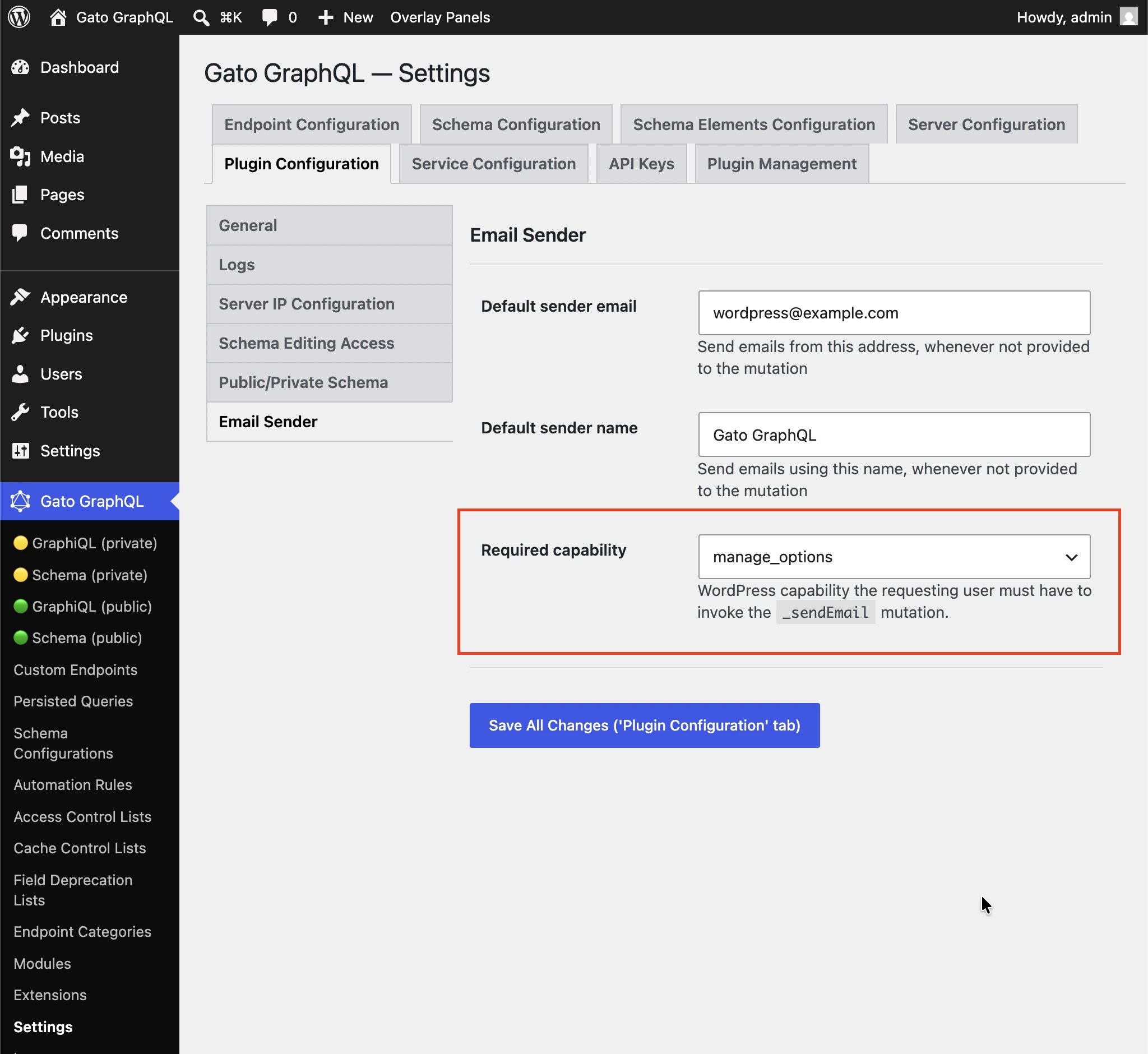
ค่าเริ่มต้นคือ manage_options เพื่อป้องกันไม่ให้ผู้ติดตาม (subscriber) ใช้ mutation นี้ในการส่ง spam ไปยังผู้รับโดยพลการ
เลือก (any logged-in user) เพื่อปิดการตรวจสอบ capability
ตัวอย่างเพิ่มเติม
queries ด้านล่างส่งอีเมลถึงผู้ใช้ admin พร้อมเนื้อหาของโพสต์ (เช่น สามารถเรียกใช้งานได้ทุกครั้งที่มีการเผยแพร่โพสต์ใหม่) โดยใช้ extension ดังต่อไปนี้:
- Multiple Query Execution เพื่อจัดการ queries เป็นหน่วยตามตรรกะ
- Helper Function Collection เพื่อเขียนข้อความอีเมลด้วย Markdown และแปลงเป็น HTML ผ่าน
_strConvertMarkdownToHTML - PHP Functions via Schema เพื่อแทรกค่าแบบไดนามิกลงในหัวข้อและข้อความอีเมลผ่าน field
_strReplaceMultipleและ_sprintf - Field to Input เพื่อดึงและส่งอีเมลของ admin จาก
wp_options
query GetPostData($postID: ID!) {
post(by: {id: $postID}) {
title @export(as: "postTitle")
excerpt @export(as: "postExcerpt")
url @export(as: "postLink")
author {
name @export(as: "postAuthorName")
url @export(as: "postAuthorLink")
}
}
}
query GetEmailData @depends(on: "GetPostData") {
emailMessageTemplate: _strConvertMarkdownToHTML(
text: """
There is a new post by [{$postAuthorName}]({$postAuthorLink}):
**{$postTitle}**: {$postExcerpt}
[Read online]({$postLink})
"""
)
emailMessage: _strReplaceMultiple(
search: ["{$postAuthorName}", "{$postAuthorLink}", "{$postTitle}", "{$postExcerpt}", "{$postLink}"],
replaceWith: [$postAuthorName, $postAuthorLink, $postTitle, $postExcerpt, $postLink],
in: $__emailMessageTemplate
)
@export(as: "emailMessage")
subject: _sprintf(string: "New post created by %s", values: [$postAuthorName])
@export(as: "emailSubject")
}
mutation SendEmail @depends(on: "GetEmailData") {
adminEmail: optionValue(name: "admin_email")
_sendEmail(
input: {
to: $__adminEmail
subject: $emailSubject
messageAs: {
html: $emailMessage
}
}
) {
status
}
}