

JetEngine CCTS
การผสานรวมกับปลั๊กอิน JetEngine ของ Crocoblock
GraphQL schema มีฟิลด์สำหรับ queries ข้อมูล Custom Content Type (CCT)
ฟิลด์หลัก
| ฟิลด์ | คำอธิบาย |
|---|---|
jetengineCCTEntries | คืนค่ารายการ CCT entry (JetEngineCCTEntry type) |
jetengineCCTEntryCount | คืนค่าจำนวน CCT entry |
jetengineCCTEntry | คืนค่า CCT entry เดียว (JetEngineCCTEntry type) |
ต้องระบุ slug ของ CCT ผ่านอาร์กิวเมนต์ slug (CCT ต้องถูกตั้งค่าให้ queryable ในการตั้งค่าปลั๊กอิน ดูด้านล่าง)
ประเภท JetEngineCCTEntry
บน JetEngineCCTEntry type สามารถ query ค่าฟิลด์ได้ผ่าน:
| ฟิลด์ | คำอธิบาย |
|---|---|
id | ID ฐานข้อมูลของ entry |
uniqueID | ตัวระบุเฉพาะสำหรับ entry ประกอบจาก CCT slug และ ID ของ entry |
cctSlug | slug ของ CCT ที่ entry นี้สังกัดอยู่ |
status | สถานะของ entry (เช่น publish, draft) |
createdDate | เวลาที่สร้าง entry |
createdDateStr | วันที่สร้าง entry ในรูปแบบสตริง |
modifiedDate | เวลาที่แก้ไข entry ล่าสุด |
modifiedDateStr | วันที่แก้ไข entry ล่าสุดในรูปแบบสตริง |
authorID | ID ของผู้เขียน entry |
author | อ็อบเจกต์การเชื่อมต่อของผู้ใช้ที่เป็นผู้เขียน |
singleCustomPostID | ID ของ single custom post ที่เชื่อมโยง (ถ้ามี) |
singleCustomPost | อ็อบเจกต์การเชื่อมต่อของ single custom post ที่เชื่อมโยง |
fieldValues | อ็อบเจกต์ JSON ที่มีฟิลด์ CCT ทั้งหมดสำหรับ entry นั้น |
fieldValue(slug) | สำหรับ query ฟิลด์เดียวด้วย slug |
ค่าฟิลด์ CCT
ค่าจาก fieldValue(slug) และแต่ละ key ใน fieldValues ถูก cast ตามประเภทฟิลด์ที่กำหนดใน CCT
ฟิลด์ ID โดยนัย (cast เป็น int เสมอเมื่อมีค่าและไม่ว่าง): id, singleCustomPostID, authorID
วิธีที่ประเภทฟิลด์ CCT แต่ละประเภทถูก cast ใน GraphQL response:
float ถ้ามีจุดทศนิยม; ไม่เช่นนั้นเป็น inttrue สำหรับ 1, true, yes, on (ไม่คำนึงถึงตัวพิมพ์)int; "Both" → อ็อบเจกต์ { id, url }; ไม่เช่นนั้นไม่เปลี่ยนแปลงint[]int; หลายรายการ → int[]ตัวอย่างด้านล่างใช้ CCT ที่มี slug "sample_cct" และฟิลด์หลายประเภท (text, number, gallery เป็นต้น)
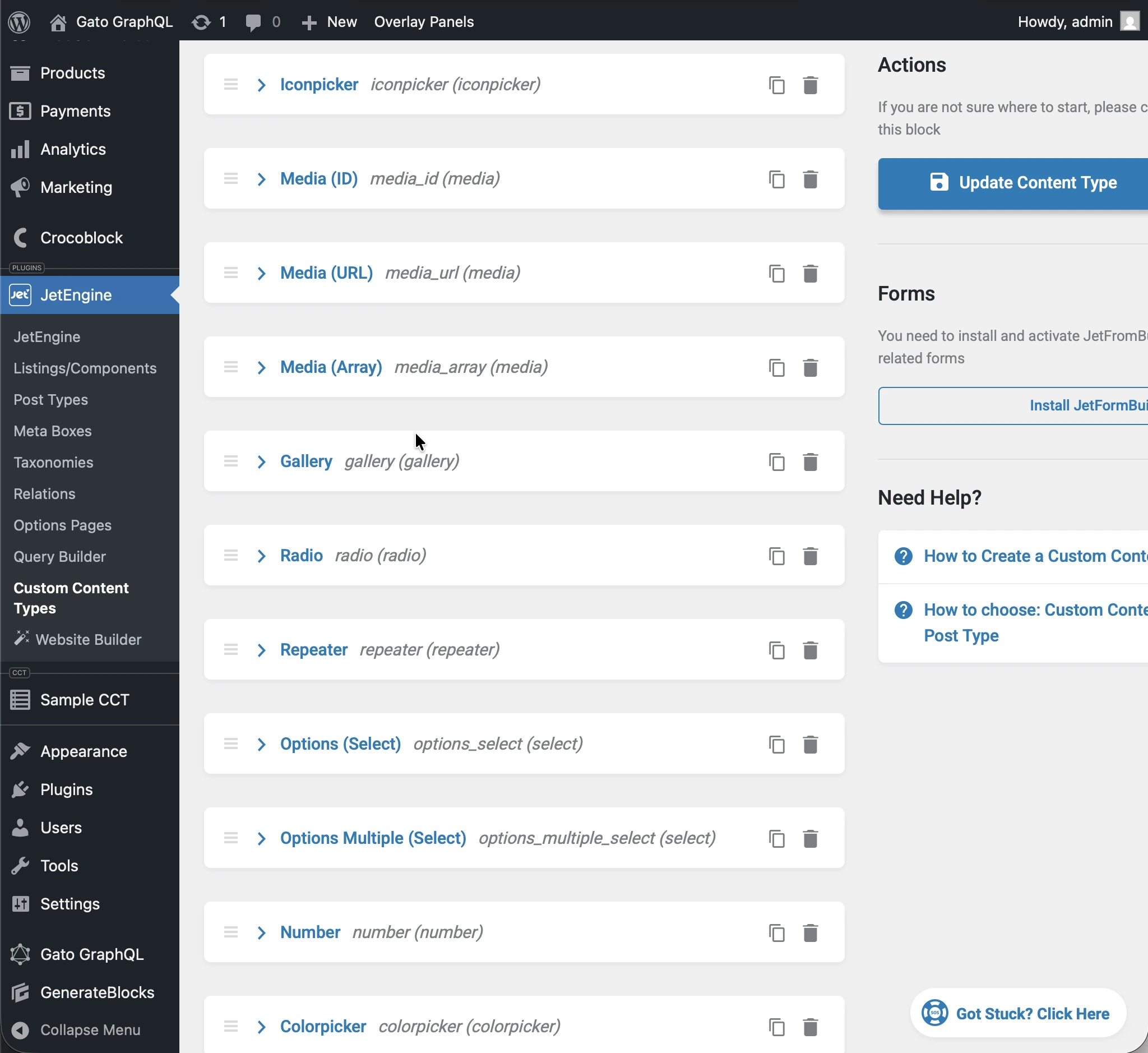
การรัน query ต่อไปนี้:
query JetEngineCCTEntries {
jetengineCCTEntry(cctSlug: "sample_cct", by: { id: 1 }) {
label_text: fieldValue(slug: "label_text")
textarea: fieldValue(slug: "textarea")
date: fieldValue(slug: "date")
time: fieldValue(slug: "time")
datetime: fieldValue(slug: "datetime")
wysisyg: fieldValue(slug: "wysisyg")
switcher: fieldValue(slug: "switcher")
checkbox: fieldValue(slug: "checkbox")
checkbox_array: fieldValue(slug: "checkbox_array")
iconpicker: fieldValue(slug: "iconpicker")
media_id: fieldValue(slug: "media_id")
media_url: fieldValue(slug: "media_url")
media_array: fieldValue(slug: "media_array")
gallery: fieldValue(slug: "gallery")
radio: fieldValue(slug: "radio")
repeater: fieldValue(slug: "repeater")
options_select: fieldValue(slug: "options_select")
options_multiple_select: fieldValue(slug: "options_multiple_select")
number: fieldValue(slug: "number")
colorpicker: fieldValue(slug: "colorpicker")
post: fieldValue(slug: "post")
posts: fieldValue(slug: "posts")
}
}...แต่ละฟิลด์ใน response จะถูก cast ตามประเภท CCT ของมัน:
{
"data": {
"jetengineCCTEntry": {
"label_text": "Some label",
"textarea": "Some description here\r\n\r\nSome description there",
"date": "2026-01-24",
"time": "09:13",
"datetime": "2026-03-07T08:00",
"wysisyg": "<p>Some <strong>description</strong> here</p>\n<p><em>Some description</em> there</p>\n<p>Some <a href=\"https://gatoplugins.com\">link</a></p>\n",
"switcher": true,
"checkbox": {
"one": true,
"two": false,
"three": true
},
"checkbox_array": [
"one",
"two"
],
"iconpicker": "fa fa-road",
"media_id": 1362,
"media_url": "https://gatographql.com/wp-content/uploads/GatoGraphQL-logo.webp",
"media_array": {
"id": 1380,
"url": "https://gatographql.com/wp-content/uploads/Funny-Dog.jpg"
},
"gallery": [
1361,
1362,
1363
],
"radio": "1",
"repeater": [
{
"label_(text)": "First item in repeater",
"date": "2026-01-17",
"time": "11:00",
"datetime": "2026-01-16T11:16",
"textarea": "Gato GraphQL provides a multitude of interactive clients,",
"wysiwyg": "<p>Gato GraphQL provides a <strong>multitude of interactive clients</strong>, and a user interface based on the <a href=\"https://wordpress.org\">WordPress editor</a>, so that anybody can operate it, whether a developer or not.</p>\n",
"switcher": true,
"iconpicker": "fa fa-inbox",
"media_id": 1361,
"media_url": "https://gatographql.com/wp-content/uploads/Funny-Dog.jpg",
"media_array": {
"id": 1380,
"url": "https://gatographql.com/wp-content/uploads/Funny-Dog.jpg"
},
"gallery": [
1363,
1361
],
"radio": "two",
"options_select": "three",
"options_multiple_select": [
"two",
"four"
],
"number": 22,
"colorpicker": "#757575",
"post": 1140,
"posts": [
1,
2
]
},
{
"label_(text)": "Second item in repeater",
"date": "2026-01-15",
"time": "00:18",
"datetime": "2026-01-18T00:00",
"textarea": "These clients make it very easy to interact with Gato GraphQL",
"wysiwyg": "<p>These clients <strong>make it very easy to interact with Gato GraphQL</strong>, directly within the <em>wp-admin</em> (and without the need of any PHP code), reducing friction and removing barriers so that anyone (developers and non-developers alike) can use it.</p>\n",
"switcher": false,
"iconpicker": "fa fa-search-plus",
"media_id": 1362,
"media_url": "https://gatographql.com/wp-content/uploads/LICENSE.txt",
"media_array": {
"id": 1363,
"url": "https://gatographql.com/wp-content/uploads/LICENSE.txt"
},
"gallery": [
1380,
1361,
1362
],
"radio": "three",
"options_select": "three",
"options_multiple_select": [
"three"
],
"number": 4469,
"colorpicker": "#2d2270",
"post": 2,
"posts": [
1688,
1682
]
}
],
"options_select": "1",
"options_multiple_select": [
"one",
"two",
"five"
],
"number": 66778899,
"colorpicker": "#721abf",
"post": 1,
"posts": [
1140,
1113
]
}
}
}การ cast ประเภทเดียวกันนี้ใช้กับทุกฟิลด์ใน JSON ที่คืนมาโดย fieldValues:
query JetEngineCCTEntries {
jetengineCCTEntry(cctSlug: "sample_cct", by: { id: 1 }) {
fieldValues
}
}...ซึ่งคืนค่า:
{
"data": {
"jetengineCCTEntry": {
"fieldValues": {
"label_text": "Some label",
"textarea": "Some description here\r\n\r\nSome description there",
"date": "2026-01-24",
"time": "09:13",
"datetime": "2026-03-07T08:00",
"wysisyg": "<p>Some <strong>description</strong> here</p>\n<p><em>Some description</em> there</p>\n<p>Some <a href=\"https://gatoplugins.com\">link</a></p>\n",
"switcher": true,
"checkbox": {
"one": true,
"two": false,
"three": true
},
"checkbox_array": [
"one",
"two"
],
"iconpicker": "fa fa-road",
"media_id": 1362,
"media_url": "https://gatographql.com/wp-content/uploads/GatoGraphQL-logo.webp",
"media_array": {
"id": 1380,
"url": "https://gatographql.com/wp-content/uploads/Funny-Dog.jpg"
},
"gallery": [
1361,
1362,
1363
],
"radio": "1",
"repeater": [
{
"label_(text)": "First item in repeater",
"date": "2026-01-17",
"time": "11:00",
"datetime": "2026-01-16T11:16",
"textarea": "Gato GraphQL provides a multitude of interactive clients,",
"wysiwyg": "<p>Gato GraphQL provides a <strong>multitude of interactive clients</strong>, and a user interface based on the <a href=\"https://wordpress.org\">WordPress editor</a>, so that anybody can operate it, whether a developer or not.</p>\n",
"switcher": true,
"iconpicker": "fa fa-inbox",
"media_id": 1361,
"media_url": "https://gatographql.com/wp-content/uploads/Funny-Dog.jpg",
"media_array": {
"id": 1380,
"url": "https://gatographql.com/wp-content/uploads/Funny-Dog.jpg"
},
"gallery": [
1363,
1361
],
"radio": "two",
"options_select": "three",
"options_multiple_select": [
"two",
"four"
],
"number": 22,
"colorpicker": "#757575",
"post": 1140,
"posts": [
1,
2
]
},
{
"label_(text)": "Second item in repeater",
"date": "2026-01-15",
"time": "00:18",
"datetime": "2026-01-18T00:00",
"textarea": "These clients make it very easy to interact with Gato GraphQL",
"wysiwyg": "<p>These clients <strong>make it very easy to interact with Gato GraphQL</strong>, directly within the <em>wp-admin</em> (and without the need of any PHP code), reducing friction and removing barriers so that anyone (developers and non-developers alike) can use it.</p>\n",
"switcher": false,
"iconpicker": "fa fa-search-plus",
"media_id": 1362,
"media_url": "https://gatographql.com/wp-content/uploads/LICENSE.txt",
"media_array": {
"id": 1363,
"url": "https://gatographql.com/wp-content/uploads/LICENSE.txt"
},
"gallery": [
1380,
1361,
1362
],
"radio": "three",
"options_select": "three",
"options_multiple_select": [
"three"
],
"number": 4469,
"colorpicker": "#2d2270",
"post": 2,
"posts": [
1688,
1682
]
}
],
"options_select": "1",
"options_multiple_select": [
"one",
"two",
"five"
],
"number": 66778899,
"colorpicker": "#721abf",
"post": 1,
"posts": [
1140,
1113
]
}
}
}
}การให้สิทธิ์เข้าถึง CCT
โดยค่าเริ่มต้น ไม่มี CCT ใดที่ queryable ได้
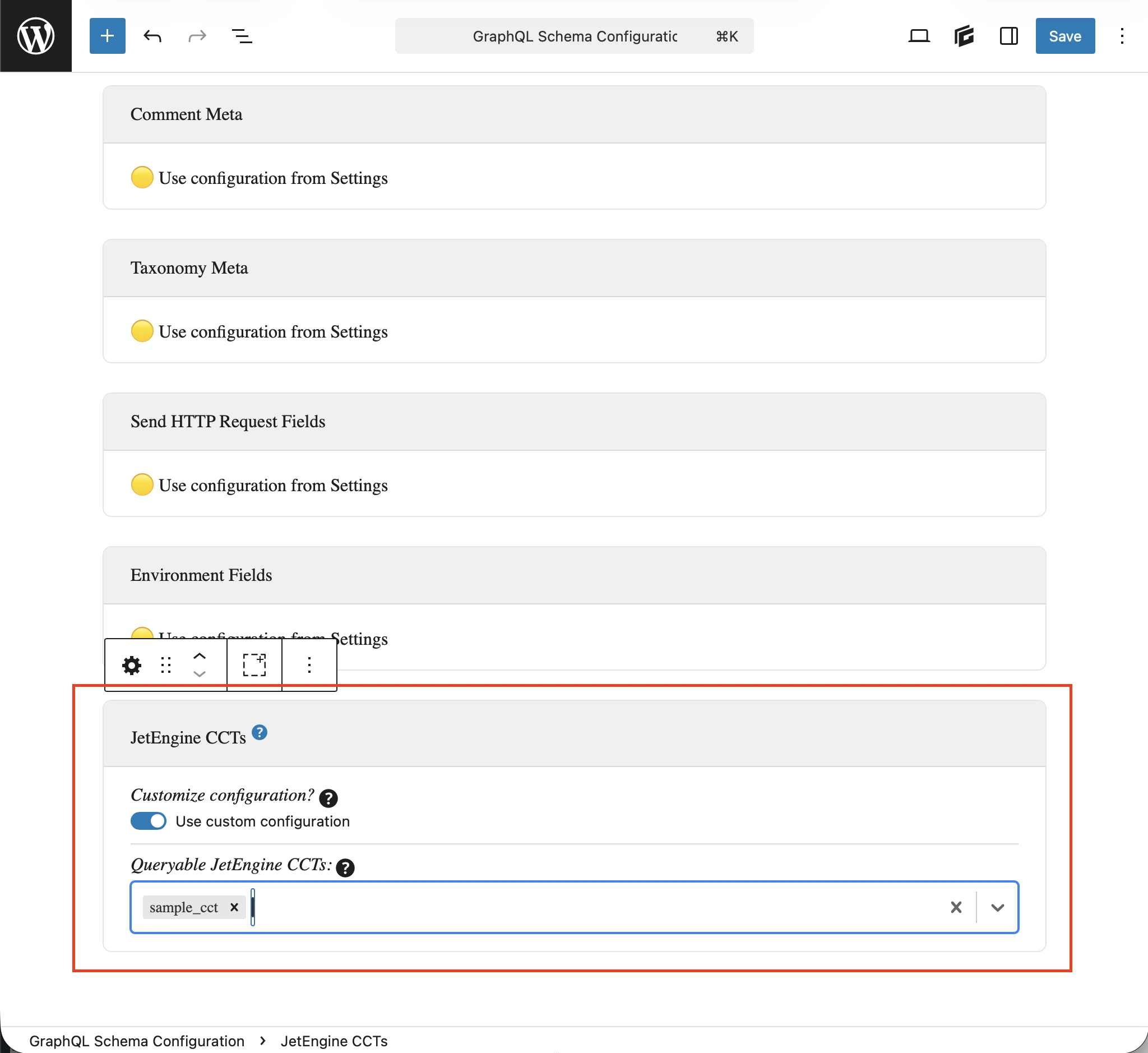
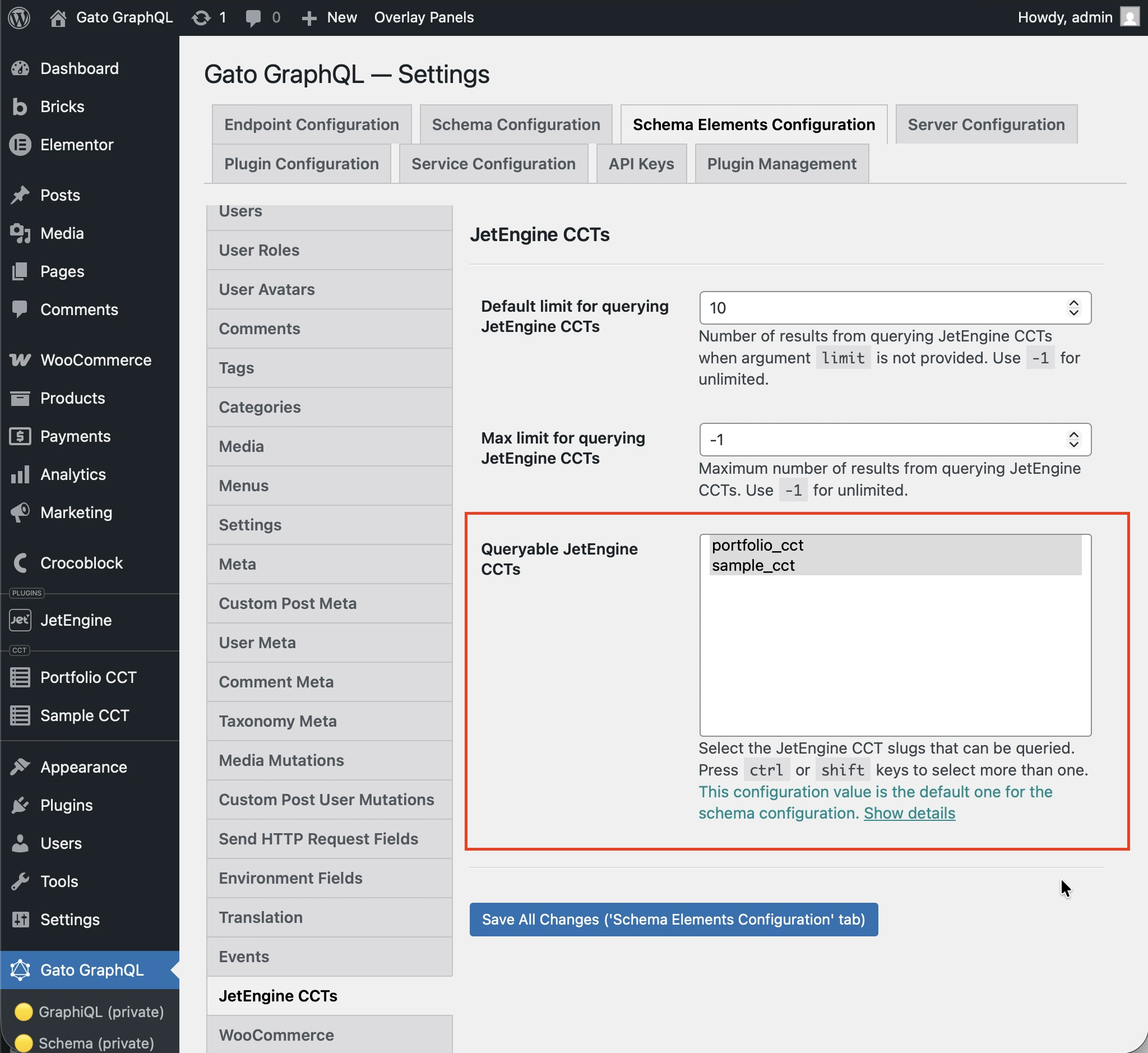
เพื่อให้สิทธิ์เข้าถึง CCT จะต้องตั้งค่า CCT ให้ queryable ในการตั้งค่าปลั๊กอิน
มี 2 ที่ที่สามารถทำการตั้งค่านี้ได้ เรียงตามลำดับความสำคัญ:
- กำหนดเอง: ใน Schema Configuration ที่เกี่ยวข้อง
- ทั่วไป: ในหน้า Settings
ใน Schema Configuration ที่ใช้กับ endpoint ให้เลือกตัวเลือก Use custom configuration แล้วป้อน entry ที่ต้องการ:
หากไม่เช่นนั้น จะใช้ entry ที่กำหนดในตัวเลือก Queryable JetEngine CCTS ภายใต้ส่วน JetEngine CCTS จากหน้า Settings:
ตัวอย่าง Queries
รายการ CCT entry:
query {
jetengineCCTEntries(cctSlug: "sample_cct") {
id
uniqueID
cctSlug
status
createdDate
modifiedDate
authorID
author {
id
name
}
singleCustomPostID
singleCustomPost {
id
title
}
fieldValues
someField: fieldValue(slug: "some_field_slug")
}
}CCT entry เดียวโดย slug และ ID:
query {
jetengineCCTEntry(cctSlug: "sample_cct", by: { id: 1 }) {
id
uniqueID
cctSlug
status
createdDate
modifiedDate
author {
id
name
}
singleCustomPost {
id
title
}
fieldValues
someField: fieldValue(slug: "some_field_slug")
}
}รายการและการนับ CCT entry พร้อม filter, pagination และ sort:
query {
jetengineCCTEntryCount(
cctSlug: "sample_cct"
filter: { search: [{ field: "cct_author_id", value: 1, operator: EQUALS }] }
)
jetengineCCTEntries(
cctSlug: "sample_cct"
filter: { search: [{ field: "cct_author_id", value: 1, operator: EQUALS }] }
pagination: { limit: 10, offset: 0 }
sort: { by: "cct_created", order: DESC }
) {
id
authorID
}
}