

ระบบอัตโนมัติWP-Cron
WP-Cron
มี action hooks ต่อไปนี้ให้ใช้งาน โดยเรียกจากภายใน WP-Cron:
gatographql__execute_query
Hook นี้รับพารามิเตอร์ต่อไปนี้ (ตามลำดับเดียวกัน):
| # | จำเป็น? | พารามิเตอร์ | คำอธิบาย |
|---|---|---|---|
| 1 | ✅ | $query | GraphQL query ที่จะเรียกใช้ |
| 2 | ❌ | $variables | ตัวแปร GraphQL |
| 3 | ❌ | $operationName | ชื่อ operation ที่จะเรียกใช้ |
| 4 | ❌ | $executeAsUser | ผู้ใช้ที่จะล็อกอินเพื่อเรียกใช้ query |
| 5 | ❌ | $schemaConfigurationIDOrSlug | ID (เป็น int) หรือ slug (เป็น string) ของการตั้งค่า schema ที่จะใช้เมื่อเรียกใช้ query การส่ง null จะใช้ค่าเริ่มต้น และการส่ง -1 หมายความว่า "ไม่ใช้การตั้งค่า schema" |
พารามิเตอร์ $executeAsUser จำเป็นต้องใช้เมื่อ query ต้องการให้ผู้ใช้ล็อกอิน เช่น เมื่อเรียกใช้ mutation:
- หากระบุ ผู้ใช้ที่มี ID (เป็น int) หรือชื่อผู้ใช้ (เป็น string) ที่กำหนดจะล็อกอินก่อนเรียกใช้ GraphQL query และล็อกออกทันทีหลังจากนั้น
- หากไม่ระบุ จะไม่มีผู้ใช้ล็อกอินเมื่อเรียกใช้ query
gatographql__execute_persisted_query
Hook นี้รับพารามิเตอร์ต่อไปนี้ (ตามลำดับเดียวกัน):
| # | จำเป็น? | พารามิเตอร์ | คำอธิบาย |
|---|---|---|---|
| 1 | ✅ | $persistedQueryIDOrSlug | ID (เป็น int) หรือ slug (เป็น string) ของ Persisted Query |
| 2 | ❌ | $variables | ตัวแปร GraphQL |
| 3 | ❌ | $operationName | ชื่อ operation ที่จะเรียกใช้ |
| 4 | ❌ | $executeAsUser | ผู้ใช้ที่จะล็อกอินเพื่อเรียกใช้ query |
โปรดทราบว่าการตั้งค่า schema ที่จะใช้ได้ถูกเลือกไว้แล้วภายใน persisted query
ตัวอย่าง
WP-Cron event ต่อไปนี้เรียกใช้ hook gatographql__execute_persisted_query เพื่อส่งอีเมลรายวันที่แสดงจำนวนความคิดเห็นใหม่ที่เพิ่มเข้ามาในไซต์:
- ใน 24 ชั่วโมงที่ผ่านมา
- ใน 1 ปีที่ผ่านมา
- ตั้งแต่ต้นเดือนนี้
- ตั้งแต่ต้นปีนี้
เราสร้าง Persisted Query ที่มี slug "daily-stats-by-email-number-of-comments" และเนื้อหาดังนี้:
query CountComments {
DATE_ISO8601: _env(name: DATE_ISO8601) @remove
timeToday: _time
dateToday: _date(format: $__DATE_ISO8601, timestamp: $__timeToday)
timeYesterday: _intSubtract(subtract: 86400, from: $__timeToday)
dateYesterday: _date(format: $__DATE_ISO8601, timestamp: $__timeYesterday)
time1YearAgo: _intSubtract(subtract: 31536000, from: $__timeToday)
date1YearAgo: _date(format: $__DATE_ISO8601, timestamp: $__time1YearAgo)
timeBegOfThisMonth: _makeTime(hour: 0, minute: 0, second: 0, day: 1)
dateBegOfThisMonth: _date(format: $__DATE_ISO8601, timestamp: $__timeBegOfThisMonth)
timeBegOfThisYear: _makeTime(hour: 0, minute: 0, second: 0, month: 1, day: 1)
dateBegOfThisYear: _date(format: $__DATE_ISO8601, timestamp: $__timeBegOfThisYear)
commentsAddedInLast24Hs: commentCount(filter: { dateQuery: { after: $__dateYesterday } } )
@export(as: "commentsAddedInLast24Hs")
commentsAddedInLast1Year: commentCount(filter: { dateQuery: { after: $__date1YearAgo } } )
@export(as: "commentsAddedInLast1Year")
commentsAddedSinceBegOfThisMonth: commentCount(filter: { dateQuery: { after: $__dateBegOfThisMonth } } )
@export(as: "commentsAddedSinceBegOfThisMonth")
commentsAddedSinceBegOfThisYear: commentCount(filter: { dateQuery: { after: $__dateBegOfThisYear } } )
@export(as: "commentsAddedSinceBegOfThisYear")
}
query CreateEmailMessage @depends(on: "CountComments") {
emailMessageTemplate: _strConvertMarkdownToHTML(
text: """
This is the number of comments added to the site:
| Period | # Comments added |
| --- | --- |
| **In the last 24 hs**: | {$commentsAddedInLast24Hs} |
| **In the last 365 days**: | {$commentsAddedInLast1Year} |
| **Since begginning of this month**: | {$commentsAddedSinceBegOfThisMonth} |
| **Since begginning of this year**: | {$commentsAddedSinceBegOfThisYear} |
"""
)
emailMessage: _strReplaceMultiple(
search: [
"{$commentsAddedInLast24Hs}",
"{$commentsAddedInLast1Year}",
"{$commentsAddedSinceBegOfThisMonth}",
"{$commentsAddedSinceBegOfThisYear}"
],
replaceWith: [
$commentsAddedInLast24Hs,
$commentsAddedInLast1Year,
$commentsAddedSinceBegOfThisMonth,
$commentsAddedSinceBegOfThisYear
],
in: $__emailMessageTemplate
)
@export(as: "emailMessage")
}
mutation SendDailyStatsByEmailNumberOfComments(
$to: [String!]!
)
@depends(on: "CreateEmailMessage")
{
_sendEmail(
input: {
to: $to
subject: "Daily stats: Number of new comments"
messageAs: {
html: $emailMessage
}
}
) {
status
}
}จากนั้น เราตั้งเวลา WP-Cron event ผ่าน PHP:
\wp_schedule_event(
time(),
'daily',
'gatographql__execute_persisted_query',
[
'daily-stats-by-email-number-of-comments',
[
'to' => ['admin@yoursite.com']
],
'SendDailyStatsByEmailNumberOfComments',
1 // This is the admin user's ID
]
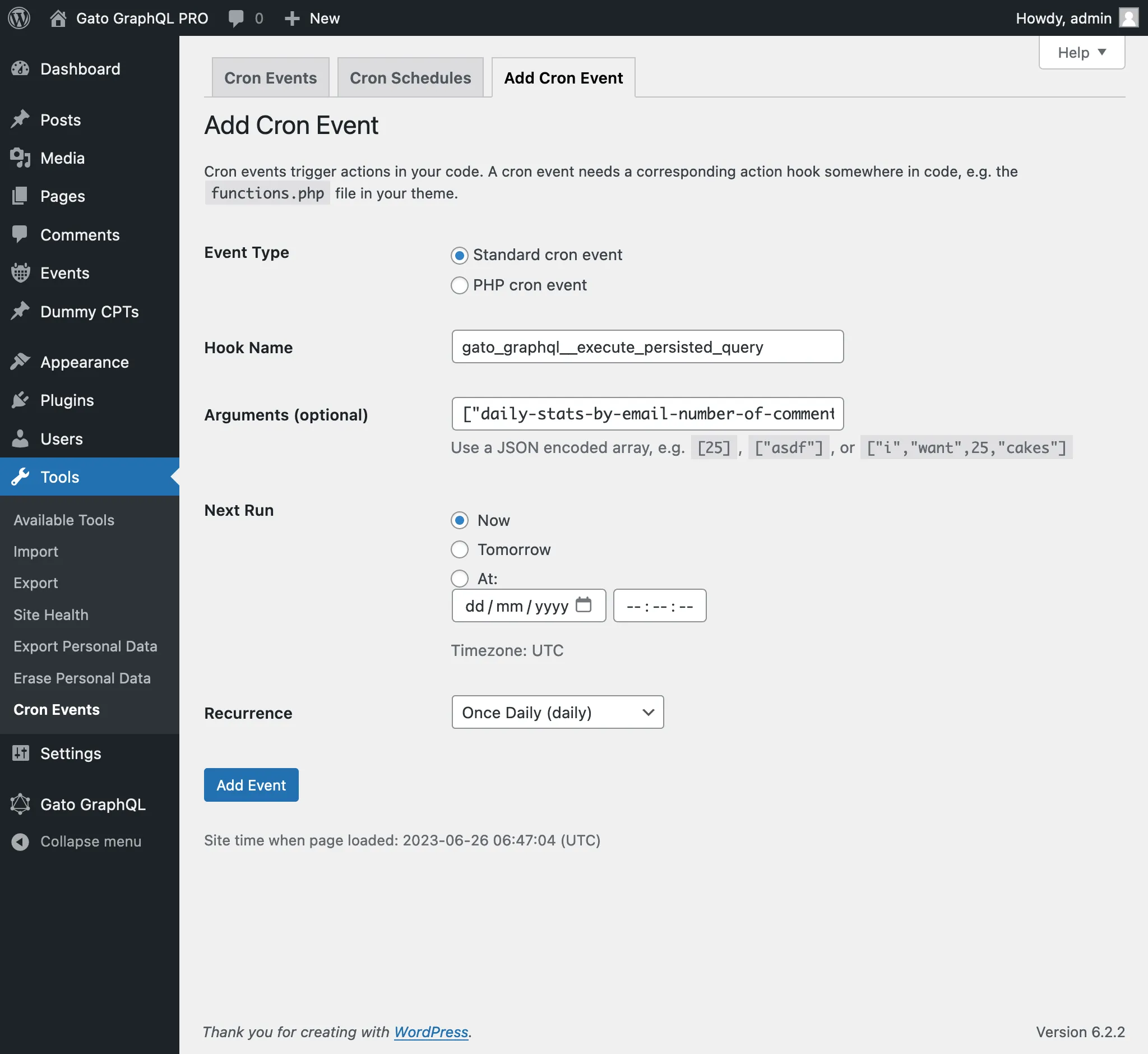
);หรือผ่านปลั๊กอิน WP-Crontrol:
- ประเภท event: Standard cron event
- ชื่อ hook:
gatographql__execute_persisted_query - อาร์กิวเมนต์:
["daily-stats-by-email-number-of-comments",{"to":["admin@yoursite.com"]},"SendDailyStatsByEmailNumberOfComments",1] - ความถี่: Once Daily
Next