

Internal GraphQL Server
ส่วนขยายนี้ติดตั้ง Internal GraphQL Server ที่สามารถเรียกใช้งานภายในแอปพลิเคชันของคุณได้ผ่านโค้ด PHP
ในบรรดากรณีการใช้งานต่างๆ คุณสามารถกระตุ้นการรัน GraphQL query เมื่อมีการกระทำบางอย่างเกิดขึ้น เพื่อดำเนินงานที่เกี่ยวข้อง (เช่น การส่งการแจ้งเตือน การเพิ่มรายการล็อก การตรวจสอบเงื่อนไข เป็นต้น)
คำอธิบาย
Internal GraphQL Server เข้าถึงได้ผ่านคลาส GatoGraphQL\InternalGraphQLServer\GraphQLServer โดยใช้สามเมธอดดังนี้:
executeQuery: รัน GraphQL queryexecuteQueryInFile: รัน GraphQL query ที่บรรจุอยู่ในไฟล์ (.gql)executePersistedQuery: รัน persisted GraphQL query (โดยระบุ ID เป็น int หรือ slug เป็น string) (ต้องใช้ส่วนขยาย Persisted Queries)
นี่คือ method signatures:
namespace GatoGraphQL\InternalGraphQLServer;
use PoP\Root\HttpFoundation\Response;
class GraphQLServer {
/**
* Execute a GraphQL query
*/
public static function executeQuery(
string $query,
array $variables = [],
?string $operationName = null,
int|string|null $schemaConfigurationIDOrSlug = null,
): Response {
// ...
}
/**
* Execute a GraphQL query contained in a (`.gql`) file
*/
public static function executeQueryInFile(
string $file,
array $variables = [],
?string $operationName = null,
int|string|null $schemaConfigurationIDOrSlug = null,
): Response {
// ...
}
/**
* Execute a persisted GraphQL query (providing its object
* of type WP_Post, ID as an int, or slug as a string)
*/
public static function executePersistedQuery(
WP_Post|string|int $persistedQuery,
array $variables = [],
?string $operationName = null
): Response {
// ...
}
}เพื่อรัน GraphQL query และรับเนื้อหาการตอบสนอง:
// Provide the GraphQL query
$query = "{ ... }";
// Execute the query against the internal server
$response = GraphQLServer::executeQuery($query);
// Get the content and decode it
$responseContent = json_decode($response->getContent(), true);
// Access the data and errors from the response
$responseData = $responseContent["data"] ?? [];
$responseErrors = $responseContent["errors"] ?? [];ออบเจ็กต์ Response ยังประกอบด้วย header ที่ถูกสร้างขึ้น (เช่น หาก Cache Control List ถูกนำไปใช้ ก็จะเพิ่ม header Cache-Control):
$responseHeaders = $response->getHeaders();
$responseCacheControlHeader = $response->getHeaderLine('Cache-Control');โปรดทราบว่าคลาส GraphQLServer ยังไม่พร้อมใช้งานก่อน WordPress core init hook
การกำหนดค่า Schema
Internal GraphQL Server ใช้ Schema Configuration ของตัวเอง ตัวอย่างเช่น ค่าเริ่มต้นจะถูกเลือกในหน้า Settings ภายใต้แท็บ "Internal GraphQL Server"
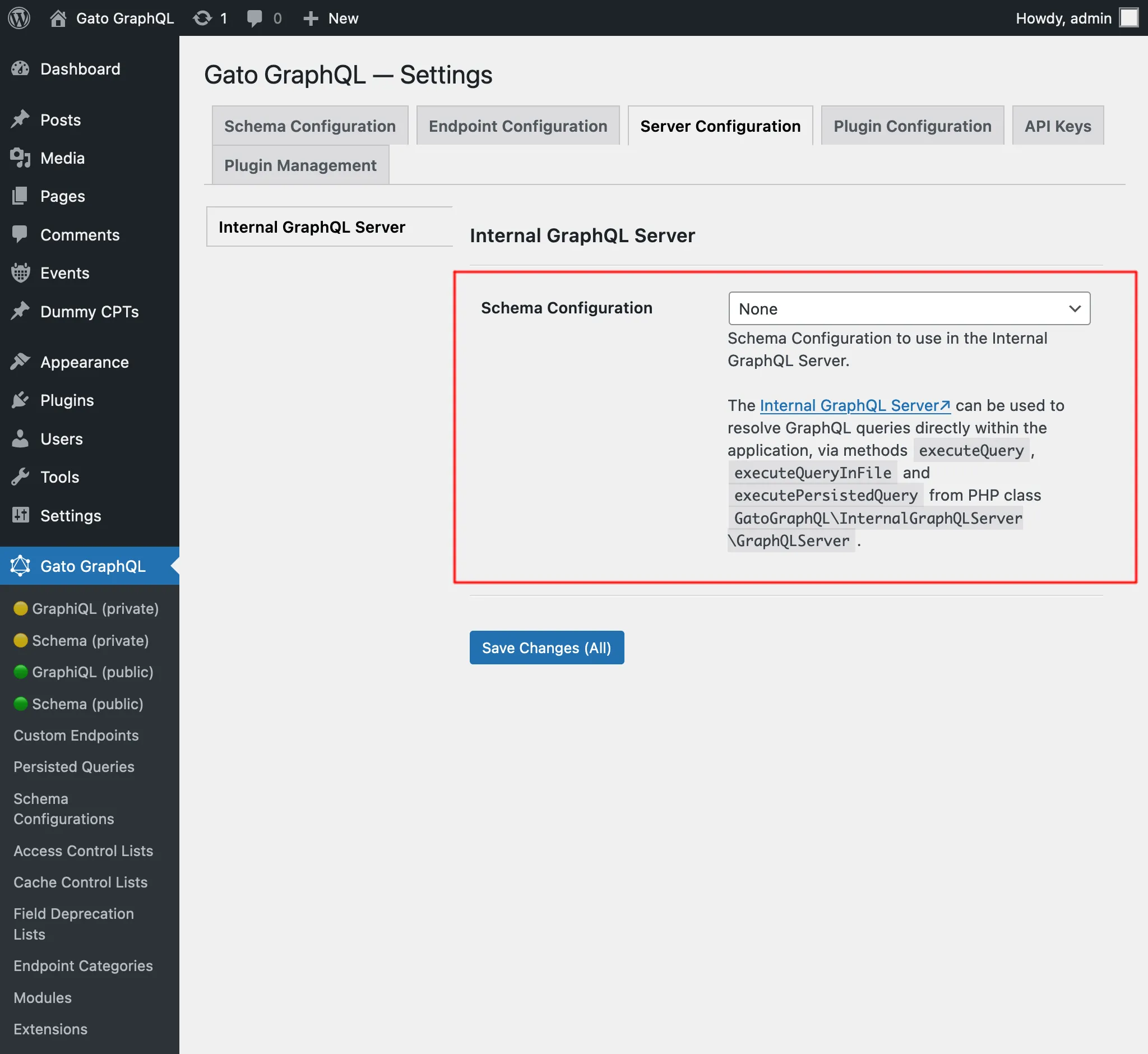
การกำหนดค่านี้ยังนำไปใช้เมื่อ query ที่รันกับ Internal GraphQL Server ถูกกระตุ้นโดย GraphQL query อื่นในระหว่างการแก้ไขที่ endpoint ที่มีการกำหนดค่าต่างกัน (เช่น public endpoint graphql/)
เพื่ออธิบาย สมมติว่าเราได้กำหนดค่า single endpoint graphql/ ให้ใช้ Access Control List เพื่อตรวจสอบผู้ใช้ตาม IP และเรารัน mutation createPost กับ endpoint นี้:
mutation {
createPost(input: {...}) {
# ...
}
}ด้วยเหตุนี้ เฉพาะผู้เยี่ยมชมจาก IP นั้นเท่านั้นที่จะสามารถรัน mutation นี้ได้
จากนั้นมี hook บน publish_post ที่รัน query กับ Internal GraphQL Server (เช่น เพื่อส่งการแจ้งเตือนไปยังผู้ดูแลระบบ):
add_action(
"publish_post",
fn (int $post_id) => GraphQLServer::executeQuery("...", ["postID" => $post_id])
);GraphQL query นี้จะถูกแก้ไขโดยใช้ schema configuration ที่ใช้กับ Internal GraphQL Server ไม่ใช่ single endpoint graphql/
ผลก็คือ การตรวจสอบตาม IP ของผู้ใช้จะไม่เกิดขึ้น (นั่นคือ เว้นแต่ว่า Access Control List นั้นจะถูกนำไปใช้กับ Internal GraphQL Server ด้วย)
การแก้ไขปัญหา
เพื่อติดตามการรัน query เราสามารถดูล็อกได้
ดูรายละเอียดเพิ่มเติมได้ที่การแก้ไขปัญหา
ตัวอย่าง
ในตัวอย่าง workflow นี้ (ซึ่งใช้โมดูล Multiple Query Execution, Helper Function Collection และ Field to Input ด้วย) เมื่อมีการสร้างโพสต์ใหม่ในไซต์ เราจะส่งการแจ้งเตือนไปยังผู้ดูแลระบบ
เรา hook เข้ากับ WordPress core action new_to_publish ดึงข้อมูลจากโพสต์ที่เพิ่งสร้าง และเรียก GraphQLServer::executeQuery:
add_action(
'new_to_publish',
function (WP_Post $post) {
if ($post->post_type !== 'post') {
return;
}
// Check the contents of the query below
$query = ' ... ';
$variables = [
'postTitle' => $post->post_title,
'postContent' => $post->post_content,
]
GraphQLServer::executeQuery($query, $variables, 'SendEmail');
}
);...พร้อมกับ GraphQL query นี้:
query GetEmailData(
$postTitle: String!,
$postContent: String!
) {
emailMessageTemplate: _strConvertMarkdownToHTML(
text: """
There is a new post on the site:
**{$postTitle}**:
{$postContent}
"""
)
emailMessage: _strReplaceMultiple(
search: ["{$postTitle}", "{$postContent}"],
replaceWith: [$postTitle, $postContent],
in: $__emailMessageTemplate
)
@export(as: "emailMessage")
}
mutation SendEmail @depends(on: "GetEmailData") {
_sendEmail(
input: {
to: "admin@site.com"
subject: "There is a new post"
messageAs: {
html: $emailMessage
}
}
) {
status
}
}