

HTTP Client
การเพิ่มฟิลด์ในสคีมา GraphQL เพื่อส่ง HTTP request ไปยังเว็บเซิร์ฟเวอร์และดึงข้อมูลการตอบสนอง:
_sendJSONObjectItemHTTPRequest_sendJSONObjectItemHTTPRequests_sendJSONObjectCollectionHTTPRequest_sendJSONObjectCollectionHTTPRequests_sendHTTPRequest_sendHTTPRequests_sendGraphQLHTTPRequest_sendGraphQLHTTPRequests
ด้วยเหตุผลด้านความปลอดภัย URL ที่สามารถเชื่อมต่อได้จะต้องได้รับการกำหนดค่าอย่างชัดเจน
รายการฟิลด์
ฟิลด์ต่อไปนี้จะถูกเพิ่มในสคีมา
_sendJSONObjectItemHTTPRequest
ดึงข้อมูลการตอบสนอง (REST) สำหรับ JSON object เดียว
Signature: _sendJSONObjectItemHTTPRequest(input: HTTPRequestInput!): JSONObject.
_sendJSONObjectItemHTTPRequests
ดึงข้อมูลการตอบสนอง (REST) สำหรับ JSON object เดียวจากหลาย endpoint โดยประมวลผลแบบอะซิงโครนัส (ขนาน) หรือซิงโครนัส (ทีละรายการ)
Signature: _sendJSONObjectItemHTTPRequests(async: Boolean = true, inputs: [HTTPRequestInput!]!): [JSONObject].
_sendJSONObjectCollectionHTTPRequest
ดึงข้อมูลการตอบสนอง (REST) สำหรับคอลเลคชันของ JSON object
Signature: _sendJSONObjectCollectionHTTPRequest(input: HTTPRequestInput!): [JSONObject].
_sendJSONObjectCollectionHTTPRequests
ดึงข้อมูลการตอบสนอง (REST) สำหรับคอลเลคชันของ JSON object จากหลาย endpoint โดยประมวลผลแบบอะซิงโครนัส (ขนาน) หรือซิงโครนัส (ทีละรายการ)
Signature: _sendJSONObjectCollectionHTTPRequests(async: Boolean = true, inputs: [HTTPRequestInput!]!): [[JSONObject]].
_sendHTTPRequest
เชื่อมต่อกับ URL ที่ระบุและดึงข้อมูล object HTTPResponse ซึ่งประกอบด้วยฟิลด์ดังต่อไปนี้:
statusCode: Int!contentType: String!body: String!headers: JSONObject!header(name: String!): StringhasHeader(name: String!): Boolean!
Signature: _sendHTTPRequest(input: HTTPRequestInput!): HTTPResponse.
_sendHTTPRequests
คล้ายกับ _sendHTTPRequest แต่รับ URL หลายรายการและสามารถเชื่อมต่อกับ URL เหล่านั้นแบบอะซิงโครนัส (ขนาน) ได้
Signature: _sendHTTPRequests(async: Boolean = true, inputs: [HTTPRequestInput!]!): [HTTPResponse].
_sendGraphQLHTTPRequest
ส่ง GraphQL query ไปยัง endpoint ที่กำหนดและดึงข้อมูลการตอบสนองในรูปแบบ JSON object
ข้อมูล input ของฟิลด์นี้รับข้อมูลที่จำเป็นสำหรับ GraphQL ได้แก่ endpoint, GraphQL query, ตัวแปร และชื่อ operation และกำหนดค่า method เริ่มต้น (POST) และ content type (application/json) ไว้แล้ว
Signature: _sendGraphQLHTTPRequest(input: GraphQLRequestInput!): JSONObject.
_sendGraphQLHTTPRequests
คล้ายกับ _sendGraphQLHTTPRequests แต่ประมวลผล GraphQL queries หลายรายการพร้อมกัน ไม่ว่าจะเป็นแบบอะซิงโครนัส (ขนาน) หรือซิงโครนัส (ทีละรายการ)
Signature: _sendGraphQLHTTPRequests(async: Boolean = true, inputs: [GraphQLRequestInput!]!): JSONObject.
การกำหนดค่า URL ที่อนุญาต
เราต้องกำหนดค่ารายการ URL ที่สามารถเชื่อมต่อได้
แต่ละรายการสามารถเป็นได้:
- นิพจน์ทั่วไป (regex) หากล้อมรอบด้วย
/หรือ#หรือ - URL แบบสมบูรณ์ ในกรณีอื่น
ตัวอย่างเช่น รายการใดๆ เหล่านี้ตรงกับ URL "https://gatographql.com/recipes/":
https://gatographql.com/recipes/#https://gatographql.com/recipes/?##https://gatographql.com/.*#/https:\\/\\/gatographql.com\\/(\S+)/
มี 2 ที่สำหรับการกำหนดค่านี้ เรียงตามลำดับความสำคัญ:
- กำหนดเอง: ใน Schema Configuration ที่เกี่ยวข้อง
- ทั่วไป: ในหน้า Settings
ใน Schema Configuration ที่ใช้กับ endpoint ให้เลือกตัวเลือก "Use custom configuration" แล้วป้อนรายการที่ต้องการ:
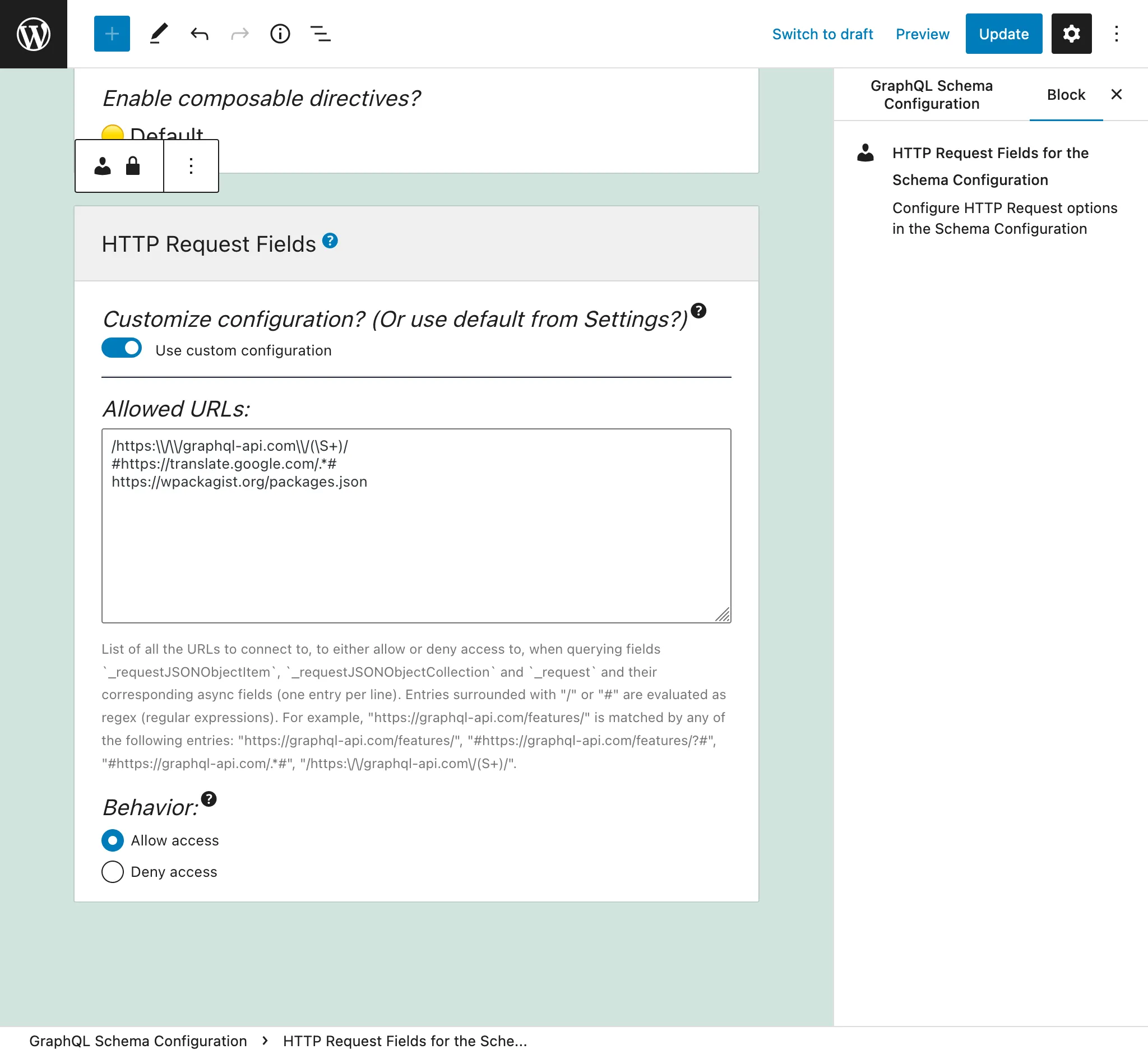
หากไม่ระบุ ระบบจะใช้รายการที่กำหนดไว้ในแท็บ "Send HTTP Request Fields" จากหน้า Settings:
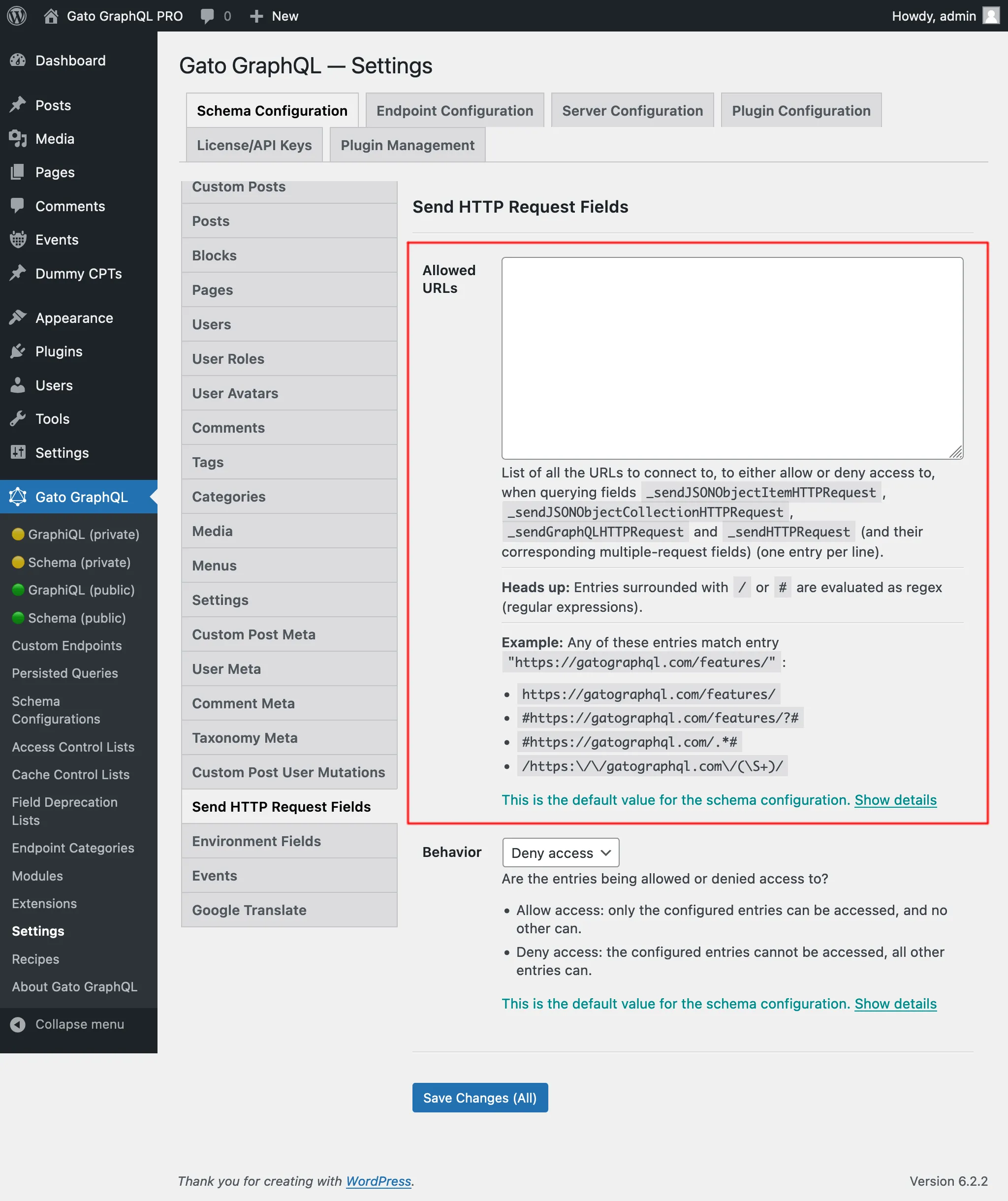
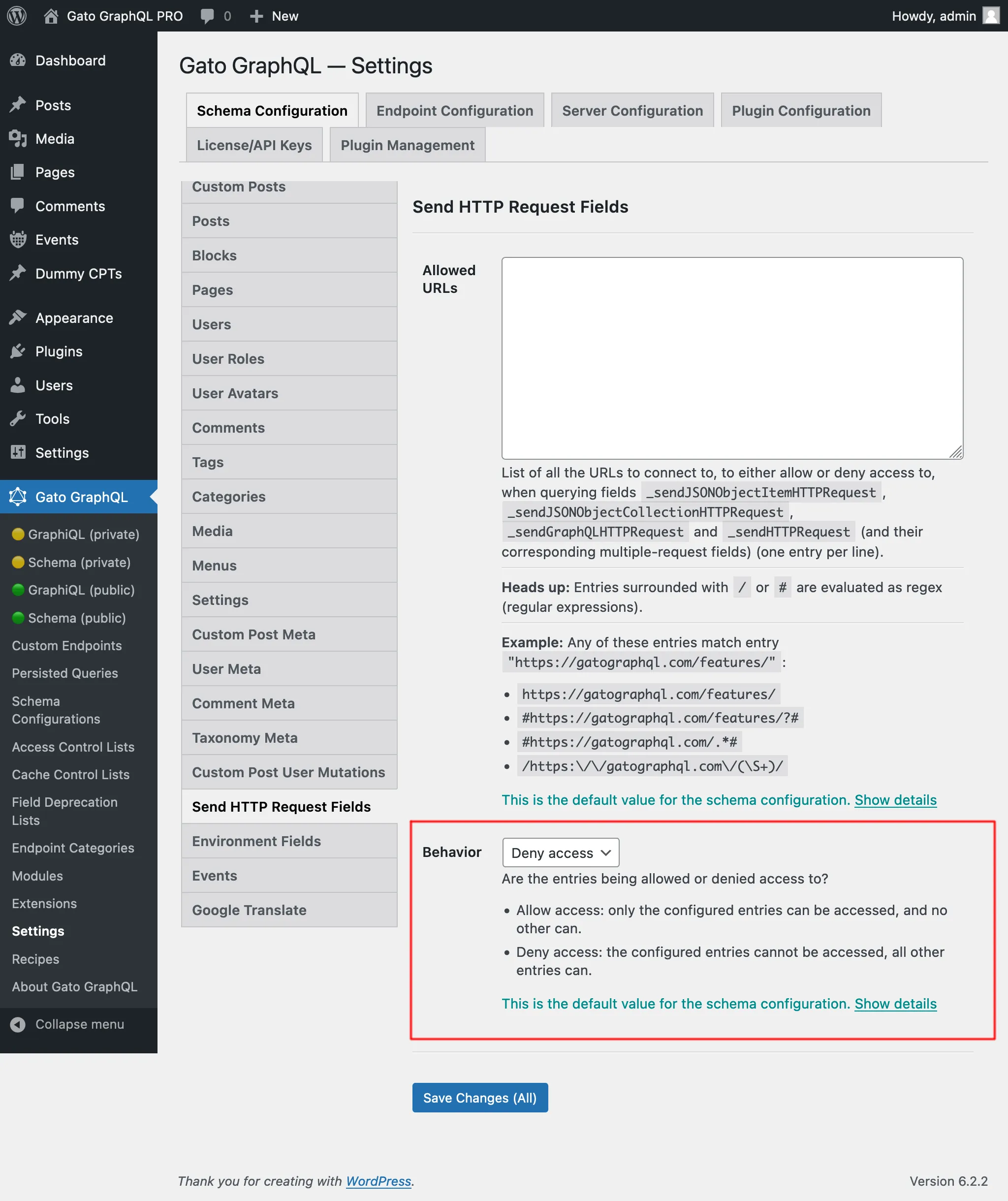
มี 2 พฤติกรรม คือ "Allow access" และ "Deny access":
- Allow access: เข้าถึงได้เฉพาะรายการที่กำหนดค่าไว้เท่านั้น รายการอื่นทั้งหมดไม่สามารถเข้าถึงได้
- Deny access: รายการที่กำหนดค่าไว้ไม่สามารถเข้าถึงได้ รายการอื่นทั้งหมดสามารถเข้าถึงได้
ความสามารถที่จำเป็นในการเข้าถึง URL ภายใน
URL บางรายการอาจส่งผลให้แก้ไขเป็นที่อยู่ภายใน (127.0.0.1, ช่วง link-local, cloud-metadata endpoints เป็นต้น) ซึ่งอาจเปิดเผยบริการภายในหากเข้าถึงได้ การตั้งค่านี้กำหนดค่าในหน้า Settings ภายใต้ Plugin Configuration > HTTP Client
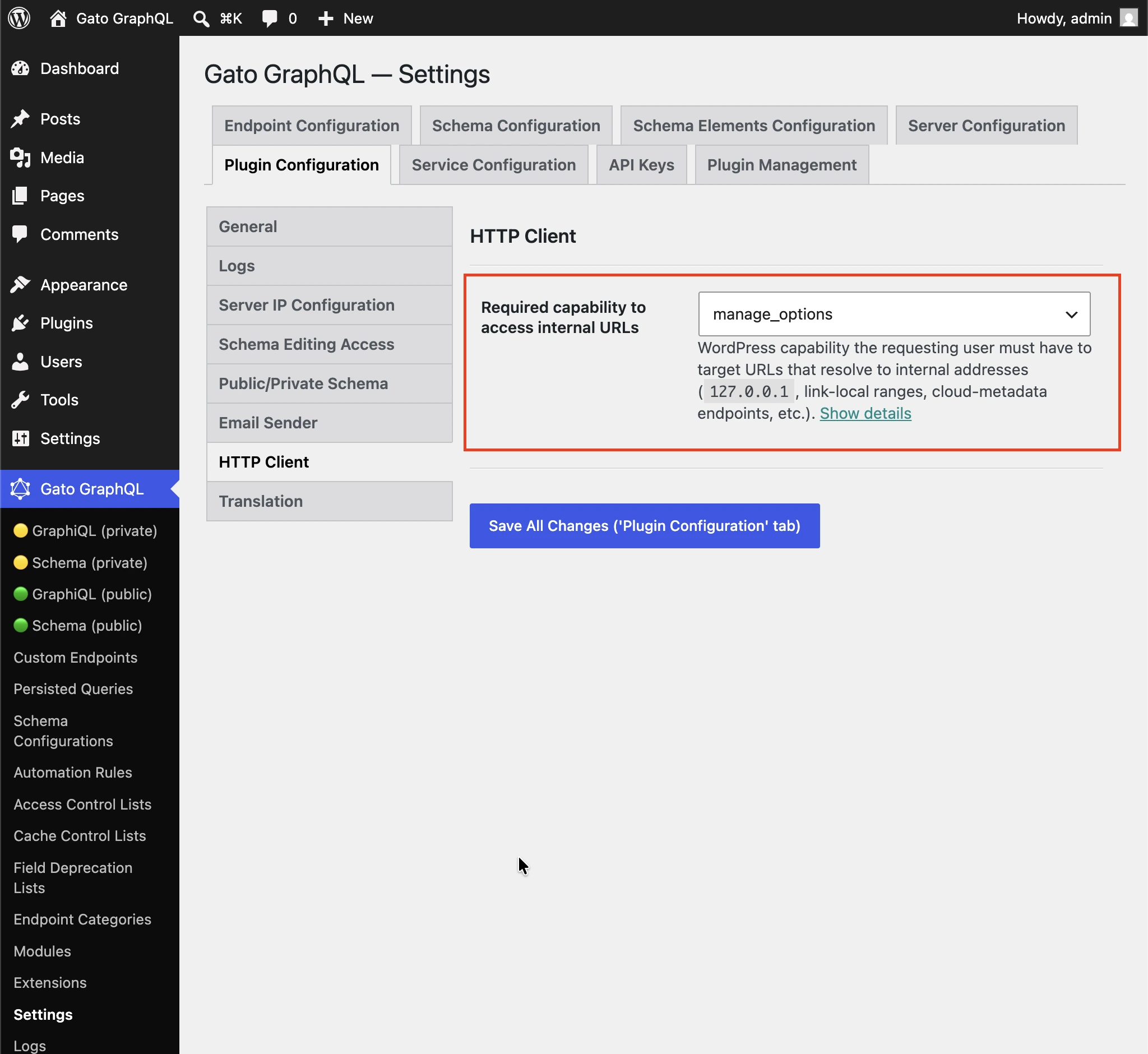
ความสามารถของ WordPress ที่ผู้ใช้ที่ส่งคำขอต้องมีเพื่อกำหนดเป้าหมาย URL ที่แก้ไขเป็นที่อยู่ภายใน (127.0.0.1, ช่วง link-local, cloud-metadata endpoints เป็นต้น)
ค่าเริ่มต้นเป็น manage_options เพื่อป้องกันไม่ให้ผู้ใช้ที่ไม่ใช่ผู้ดูแลระบบเข้าถึงบริการภายในผ่านฟิลด์ HTTP Client
เลือก (any logged-in user) เพื่อปิดการตรวจสอบความสามารถ
การเลือกใช้ฟิลด์แต่ละตัว
ฟิลด์ทั้งหมดมีความคล้ายคลึงกันแต่แตกต่างกัน
_sendJSONObjectItemHTTPRequest
ฟิลด์นี้ดึงข้อมูล JSON object item เดียว ซึ่งมีประโยชน์เมื่อ query รายการเดียวจาก REST endpoint เช่น จาก WP REST API endpoint /wp-json/wp/v2/posts/1/
Query นี้:
{
postData: _sendJSONObjectItemHTTPRequest(input: { url: "https://newapi.getpop.org/wp-json/wp/v2/posts/1/" } )
}...ดึงข้อมูลการตอบสนองนี้:
{
"data": {
"postData": {
"id": 1,
"date": "2019-08-02T07:53:57",
"date_gmt": "2019-08-02T07:53:57",
"guid": {
"rendered": "https:\/\/newapi.getpop.org\/?p=1"
},
"modified": "2021-01-14T13:18:39",
"modified_gmt": "2021-01-14T13:18:39",
"slug": "hello-world",
"status": "publish",
"type": "post",
"link": "https:\/\/newapi.getpop.org\/uncategorized\/hello-world\/",
"title": {
"rendered": "Hello world!"
},
"content": {
"rendered": "\n<p>Welcome to WordPress. This is your first post. Edit or delete it, then start writing!<\/p>\n\n\n\n<p>I’m demonstrating a Youtube video:<\/p>\n\n\n\n<figure class=\"wp-block-embed is-type-video is-provider-youtube wp-block-embed-youtube wp-embed-aspect-16-9 wp-has-aspect-ratio\"><div class=\"wp-block-embed__wrapper\">\n<iframe loading=\"lazy\" title=\"Introduction to the Component-based API by Leonardo Losoviz | JSConf.Asia 2019\" width=\"750\" height=\"422\" src=\"https:\/\/www.youtube.com\/embed\/9pT-q0SSYow?feature=oembed\" frameborder=\"0\" allow=\"accelerometer; autoplay; clipboard-write; encrypted-media; gyroscope; picture-in-picture\" allowfullscreen><\/iframe>\n<\/div><figcaption>This is my presentation in JSConf Asia 2019<\/figcaption><\/figure>\n",
"protected": false
},
"excerpt": {
"rendered": "<p>Welcome to WordPress. This is your first post. Edit or delete it, then start writing! I’m demonstrating a Youtube video:<\/p>\n",
"protected": false
},
"author": 1,
"featured_media": 0,
"comment_status": "closed",
"ping_status": "open",
"sticky": false,
"template": "",
"format": "standard",
"meta": [],
"categories": [
1
],
"tags": [
193,
173
]
}
}
}_sendJSONObjectCollectionHTTPRequest
ฟิลด์นี้คล้ายกับ _sendJSONObjectItemHTTPRequest แต่ดึงข้อมูลคอลเลคชันของ JSON object เช่น จาก WP REST API endpoint /wp-json/wp/v2/posts/
Query นี้:
{
postData: _sendJSONObjectItemHTTPRequest(input: { url: "https://newapi.getpop.org/wp-json/wp/v2/posts/?per_page=3&_fields=id,type,title,date" } )
}...ดึงข้อมูลการตอบสนองนี้:
{
"data": {
"postData": [
{
"id": 1692,
"date": "2022-04-26T10:10:08",
"type": "post",
"title": {
"rendered": "My Blogroll"
}
},
{
"id": 1657,
"date": "2020-12-21T08:24:18",
"type": "post",
"title": {
"rendered": "A tale of two cities – teaser"
}
},
{
"id": 1499,
"date": "2019-08-08T02:49:36",
"type": "post",
"title": {
"rendered": "COPE with WordPress: Post demo containing plenty of blocks"
}
}
]
}
}_sendHTTPRequest
ฟิลด์นี้ดึงข้อมูล object HTTPResponse ที่มีคุณสมบัติทั้งหมดจากการตอบสนอง เพื่อให้เราสามารถ query body (ซึ่งเป็นประเภท String กล่าวคือไม่ถูก cast เป็น JSON), status code, content type และ headers แยกกันได้
ตัวอย่างเช่น query ต่อไปนี้:
{
_sendHTTPRequest(
input: {
url: "https://newapi.getpop.org/wp-json/wp/v2/comments/11/?_fields=id,date,content"
}
) {
statusCode
contentType
headers
body
contentLengthHeader: header(name: "Content-Length")
cacheControlHeader: header(name: "Cache-Control")
}
}...ส่งคืนการตอบสนองนี้:
{
"data": {
"_sendHTTPRequest": {
"statusCode": 200,
"contentType": "application\/json; charset=UTF-8",
"headers": {
"Access-Control-Allow-Headers": "Authorization, X-WP-Nonce, Content-Disposition, Content-MD5, Content-Type",
"Access-Control-Expose-Headers": "X-WP-Total, X-WP-TotalPages, Link",
"Allow": "GET",
"Cache-Control": "max-age=300,no-store",
"Content-Length": "508"
},
"body": "{\"id\":11,\"date\":\"2020-12-12T04:09:36\",\"content\":{\"rendered\":\"<p>Wow, this sounds awesome!<\\\/p>\\n\"},\"_links\":{\"self\":[{\"href\":\"https:\\\/\\\/newapi.getpop.org\\\/wp-json\\\/wp\\\/v2\\\/comments\\\/11\"}],\"collection\":[{\"href\":\"https:\\\/\\\/newapi.getpop.org\\\/wp-json\\\/wp\\\/v2\\\/comments\"}],\"author\":[{\"embeddable\":true,\"href\":\"https:\\\/\\\/newapi.getpop.org\\\/wp-json\\\/wp\\\/v2\\\/users\\\/3\"}],\"up\":[{\"embeddable\":true,\"post_type\":\"post\",\"href\":\"https:\\\/\\\/newapi.getpop.org\\\/wp-json\\\/wp\\\/v2\\\/posts\\\/28\"}]}}",
"contentLengthHeader": "508",
"cacheControlHeader": "max-age=300,no-store"
}
}
}_sendGraphQLHTTPRequest
การส่ง query ต่อไปนี้:
{
graphQLRequest: _sendGraphQLHTTPRequest(
input: {
endpoint: "https://newapi.getpop.org/api/graphql/"
query: """
query GetPosts($postIDs: [ID]!) {
posts(filter: { ids: $postIDs }) {
id
title
}
}
"""
variables: [
{
name: "postIDs",
value: [1, 1499]
}
]
}
)
}...ส่งคืนการตอบสนองดังต่อไปนี้:
{
"data": {
"graphQLRequest": {
"data": {
"posts": [
{
"id": 1499,
"title": "COPE with WordPress: Post demo containing plenty of blocks"
},
{
"id": 1,
"title": "Hello world!"
}
]
}
}
}
}ฟิลด์สำหรับคำขอหลายรายการ: _sendJSONObjectItemHTTPRequests, _sendJSONObjectCollectionHTTPRequests, _sendGraphQLHTTPRequests และ _sendHTTPRequests
ฟิลด์เหล่านี้ทำงานคล้ายกับฟิลด์เดี่ยวที่สอดคล้องกัน แต่ดึงข้อมูลจากหลาย endpoint พร้อมกัน ไม่ว่าจะเป็นแบบอะซิงโครนัส (ขนาน) หรือซิงโครนัส (ทีละรายการ) การตอบสนองจะถูกวางไว้ในรายการตามลำดับเดียวกับที่ URL ถูกกำหนดในพารามิเตอร์ urls
ตัวอย่างเช่น query ต่อไปนี้:
{
weatherForecasts: _sendJSONObjectItemHTTPRequests(
urls: [
"https://api.weather.gov/gridpoints/TOP/31,80/forecast",
"https://api.weather.gov/gridpoints/TOP/41,55/forecast"
]
)
}...สร้างการตอบสนองนี้:
{
"data": {
"weatherForecasts": [
{
"type": "Feature",
"geometry": {
"type": "Polygon",
"coordinates": [
[
[
-97.1089731,
39.766826299999998
],
[
-97.108526900000001,
39.744778799999999
]
]
]
},
"properties": {
"updated": "2022-03-04T09:39:46+00:00",
"units": "us",
"forecastGenerator": "BaselineForecastGenerator",
"generatedAt": "2022-03-04T10:31:47+00:00",
"updateTime": "2022-03-04T09:39:46+00:00",
"validTimes": "2022-03-04T03:00:00+00:00/P7DT22H",
"elevation": {
"unitCode": "wmoUnit:m",
"value": 441.95999999999998
}
}
},
{
"type": "Feature",
"geometry": {
"type": "Polygon",
"coordinates": [
[
[
-96.812529900000001,
39.218048000000003
],
[
-96.812148500000006,
39.195940300000004
]
]
]
},
"properties": {
"updated": "2022-03-04T09:39:46+00:00",
"units": "us",
"forecastGenerator": "BaselineForecastGenerator",
"generatedAt": "2022-03-04T10:42:26+00:00",
"updateTime": "2022-03-04T09:39:46+00:00",
"validTimes": "2022-03-04T03:00:00+00:00/P7DT22H",
"elevation": {
"unitCode": "wmoUnit:m",
"value": 409.04160000000002
}
}
}
]
}
}การประมวลผลแบบซิงโครนัสและอะซิงโครนัส
ฟิลด์เหล่านี้ช่วยให้เราส่งคำขอหลายรายการได้:
_sendHTTPRequests_sendJSONObjectItemHTTPRequests_sendJSONObjectCollectionHTTPRequests_sendGraphQLHTTPRequests
ฟิลด์เหล่านี้รับ input $async เพื่อกำหนดว่าคำขอจะต้องประมวลผลแบบซิงโครนัส ($async => false) หรือแบบอะซิงโครนัส
การประมวลผลแบบซิงโครนัส
HTTP request จะถูกประมวลผลตามลำดับ โดยแต่ละรายการจะถูกประมวลผลทันทีหลังจากรายการก่อนหน้าเสร็จสิ้น
เมื่อ HTTP request ทั้งหมดสำเร็จ ฟิลด์จะแสดงอาร์เรย์ที่มีการตอบสนองตามลำดับเดียวกับที่ปรากฏในรายการ input
หากมี HTTP request ใดล้มเหลว การประมวลผลจะหยุดทันที กล่าวคือ HTTP request ที่เหลืออยู่ในรายการ input จะไม่ถูกประมวลผล
สาเหตุที่เป็นไปได้บางประการของ HTTP request ที่ล้มเหลว:
- เซิร์ฟเวอร์ที่ต้องการเชื่อมต่อออฟไลน์อยู่
- status code ของการตอบสนองไม่ใช่ 200: เช่น 500 internal error, 404 not found, 403 forbidden เป็นต้น
- content type ของการตอบสนองไม่ใช่
application/json
(สองข้อหลังถือเป็นข้อผิดพลาดโดย _sendJSONObjectItemHTTPRequests, _sendJSONObjectCollectionHTTPRequests และ _sendGraphQLHTTPRequests ซึ่งคาดว่าจะจัดการประเภท JSON เท่านั้น แต่ไม่ถือเป็นข้อผิดพลาดโดย _sendHTTPRequests ซึ่งไม่มีข้อกำหนดเฉพาะ)
ในกรณีเกิดข้อผิดพลาด ฟิลด์จะส่งคืน null (กล่าวคือ การตอบสนองของ HTTP request ที่สำเร็จก่อนหน้าจะไม่ถูกแสดง) และรายการข้อผิดพลาดจะมี extension httpRequestInputArrayPosition เพื่อระบุว่ารายการใดในรายการ input ที่ล้มเหลว (เริ่มจาก 0):
{
"errors": [
{
"message": "Server error: `GET https:\/\/mysite.com\/page-triggering-some-500-error` resulted in a `500 Internal Server Error` response",
"extensions": {
"httpRequestInputArrayPosition": 0,
"field": "_sendJSONObjectItemHTTPRequests(async: false, inputs: [{url: \"https:\/\/mysite.com\/page-triggering-some-500-error\"}, {url: \"https:\/\/mysite.com\/wp-json\/wp\/v2\/posts\/1\/\"}, {url: \"https:\/\/mysite.com\/wp-json\/wp\/v2\/users\/1\/\"}])"
}
}
],
"data": {
"_sendJSONObjectItemHTTPRequests": null
}
}การประมวลผลแบบอะซิงโครนัส
HTTP request ทั้งหมดจะถูกประมวลผลพร้อมกัน (กล่าวคือขนานกัน) และไม่ทราบว่า HTTP request จะเสร็จสิ้นตามลำดับใด
เมื่อ HTTP request ทั้งหมดสำเร็จ ฟิลด์จะแสดงอาร์เรย์ที่มีการตอบสนองตามลำดับเดียวกับที่ปรากฏในรายการ input
เมื่อ HTTP request ใดก็ตามล้มเหลว การประมวลผลจะหยุดทันที อย่างไรก็ตาม ณ เวลานั้น HTTP request อื่นๆ ทั้งหมดอาจถูกประมวลผลไปแล้วเช่นกัน
นอกจากนี้ เซิร์ฟเวอร์จะไม่ระบุว่ารายการใดในรายการที่ล้มเหลว (สังเกตว่าไม่มี extension httpRequestInputArrayPosition ในการตอบสนองด้านล่าง):
{
"errors": [
{
"message": "Server error: `GET https:\/\/mysite.com\/page-triggering-some-500-error` resulted in a `500 Internal Server Error` response",
"extensions": {
"field": "_sendJSONObjectItemHTTPRequests(async: true, inputs: [{url: \"https:\/\/mysite.com\/page-triggering-some-500-error\"}, {url: \"https:\/\/mysite.com\/wp-json\/wp\/v2\/posts\/1\/\"}, {url: \"https:\/\/mysite.com\/wp-json\/wp\/v2\/users\/1\/\"}])"
}
}
],
"data": {
"_sendJSONObjectItemHTTPRequests": null
}
}Global Fields
ฟิลด์เหล่านี้ทั้งหมดเป็น Global Fields ดังนั้นจึงถูกเพิ่มในทุกประเภทในสคีมา GraphQL: ทั้งใน QueryRoot และใน Post, User, Comment เป็นต้น
สิ่งนี้ช่วยให้เราสามารถเชื่อมต่อกับ external API endpoint ที่สร้างขึ้นในขณะรันไทม์ใน GraphQL query เดียวกัน โดยอิงตามข้อมูลที่เก็บไว้ในบาง entity
ตัวอย่างเช่น เราสามารถวนซ้ำรายการผู้ใช้ในฐานข้อมูลของเรา และสำหรับแต่ละคน เชื่อมต่อกับระบบภายนอก (เช่น CRM) เพื่อดึงข้อมูลเพิ่มเติมเกี่ยวกับพวกเขา
ใน query นี้ เราสร้าง API endpoint โดยใช้ฟีเจอร์ Field to Input และฟังก์ชันฟิลด์ _arrayJoin:
{
users(
pagination: { limit: 2 },
sort: { order: ASC, by: ID }
) {
id
endpoint: _arrayJoin(values: [
"https://newapi.getpop.org/wp-json/wp/v2/users/",
$__id,
"?_fields=name"
])
_sendJSONObjectItemHTTPRequest(input: { url: $__endpoint } )
}
}...ให้ผลลัพธ์:
{
"data": {
"users": [
{
"id": 1,
"endpoint": "https://newapi.getpop.org/wp-json/wp/v2/users/1?_fields=name",
"_sendJSONObjectItemHTTPRequest": {
"name": "leo",
"_links": {
"self": [
{
"href": "https://newapi.getpop.org/wp-json/wp/v2/users/1"
}
],
"collection": [
{
"href": "https://newapi.getpop.org/wp-json/wp/v2/users"
}
]
}
}
},
{
"id": 2,
"endpoint": "https://newapi.getpop.org/wp-json/wp/v2/users/2?_fields=name",
"_sendJSONObjectItemHTTPRequest": {
"name": "themedemos",
"_links": {
"self": [
{
"href": "https://newapi.getpop.org/wp-json/wp/v2/users/2"
}
],
"collection": [
{
"href": "https://newapi.getpop.org/wp-json/wp/v2/users"
}
]
}
}
}
]
}
}