

บทเรียนที่ 15: การส่งสรุปกิจกรรมประจำวัน
เราสามารถผสานรวม Gato GraphQL กับ WP-Cron เพื่อทำงานอัตโนมัติในการรัน GraphQL queries ที่ทำงานด้านการดูแลระบบตามช่วงเวลาที่กำหนด (จำเป็นต้องใช้ส่วนขยาย Automation)
ในบทเรียนนี้ เราจะตั้งค่า WP-Cron ให้รัน GraphQL query ทุก ๆ 24 ชั่วโมง เพื่อดึงจำนวนคอมเมนต์ใหม่ที่เพิ่มเข้ามาในเว็บไซต์ และส่งสถิติเหล่านี้ไปยังบัญชีอีเมลที่ต้องการ
GraphQL query พร้อมสถิติคอมเมนต์ใหม่ประจำวัน
GraphQL query นี้จะส่งอีเมลที่ระบุจำนวนคอมเมนต์ใหม่ที่เพิ่มเข้ามาในเว็บไซต์สำหรับช่วงเวลาต่าง ๆ ดังนี้:
- ในช่วง 24 ชั่วโมงที่ผ่านมา
- ในช่วง 1 ปีที่ผ่านมา
- ตั้งแต่ต้นเดือน
- ตั้งแต่ต้นปี
เราจะสร้าง Persisted Query ด้วย slug "daily-stats-by-email-number-of-comments" และมีเนื้อหาดังนี้:
query CountComments {
DATE_ISO8601: _env(name: DATE_ISO8601) @remove
timeToday: _time
dateToday: _date(format: $__DATE_ISO8601, timestamp: $__timeToday)
timeYesterday: _intSubtract(subtract: 86400, from: $__timeToday)
dateYesterday: _date(format: $__DATE_ISO8601, timestamp: $__timeYesterday)
time1YearAgo: _intSubtract(subtract: 31536000, from: $__timeToday)
date1YearAgo: _date(format: $__DATE_ISO8601, timestamp: $__time1YearAgo)
timeBegOfThisMonth: _makeTime(hour: 0, minute: 0, second: 0, day: 1)
dateBegOfThisMonth: _date(format: $__DATE_ISO8601, timestamp: $__timeBegOfThisMonth)
timeBegOfThisYear: _makeTime(hour: 0, minute: 0, second: 0, month: 1, day: 1)
dateBegOfThisYear: _date(format: $__DATE_ISO8601, timestamp: $__timeBegOfThisYear)
commentsAddedInLast24Hs: commentCount(filter: { dateQuery: { after: $__dateYesterday } } )
@export(as: "commentsAddedInLast24Hs")
commentsAddedInLast1Year: commentCount(filter: { dateQuery: { after: $__date1YearAgo } } )
@export(as: "commentsAddedInLast1Year")
commentsAddedSinceBegOfThisMonth: commentCount(filter: { dateQuery: { after: $__dateBegOfThisMonth } } )
@export(as: "commentsAddedSinceBegOfThisMonth")
commentsAddedSinceBegOfThisYear: commentCount(filter: { dateQuery: { after: $__dateBegOfThisYear } } )
@export(as: "commentsAddedSinceBegOfThisYear")
}
query CreateEmailMessage @depends(on: "CountComments") {
emailMessageTemplate: _strConvertMarkdownToHTML(
text: """
This is the number of comments added to the site:
| Period | # Comments added |
| --- | --- |
| **In the last 24 hs**: | {$commentsAddedInLast24Hs} |
| **In the last 365 days**: | {$commentsAddedInLast1Year} |
| **Since begginning of this month**: | {$commentsAddedSinceBegOfThisMonth} |
| **Since begginning of this year**: | {$commentsAddedSinceBegOfThisYear} |
"""
)
emailMessage: _strReplaceMultiple(
search: [
"{$commentsAddedInLast24Hs}",
"{$commentsAddedInLast1Year}",
"{$commentsAddedSinceBegOfThisMonth}",
"{$commentsAddedSinceBegOfThisYear}"
],
replaceWith: [
$commentsAddedInLast24Hs,
$commentsAddedInLast1Year,
$commentsAddedSinceBegOfThisMonth,
$commentsAddedSinceBegOfThisYear
],
in: $__emailMessageTemplate
)
@export(as: "emailMessage")
}
mutation SendDailyStatsByEmailNumberOfComments(
$to: [String!]!
)
@depends(on: "CreateEmailMessage")
{
_sendEmail(
input: {
to: $to
subject: "Daily stats: Number of new comments"
messageAs: {
html: $emailMessage
}
}
) {
status
}
}การตั้งเวลาการรัน GraphQL query ผ่าน WP-Cron
เราต้องตั้งเวลาอีเวนต์ WP-Cron ให้รันฮุก gatographql__execute_persisted_query ของ Gato GraphQL โดยส่งอีเมลที่จะใช้ส่งอีเมลไปเป็นอาร์กิวเมนต์ และกำหนดความถี่ในการทำซ้ำ (รายวัน)
เราทำสิ่งนี้ได้ผ่าน PHP:
wp_schedule_event(
time(),
'daily',
'gatographql__execute_persisted_query',
[
'daily-stats-by-email-number-of-comments',
[
'to' => ['admin@mysite.com']
],
'SendDailyStatsByEmailNumberOfComments',
1 // This is the admin user's ID
]
);หรือผ่านปลั๊กอิน WP-Crontrol:
- Event type: Standard cron event
- Hook name:
gatographql__execute_persisted_query - Arguments:
["daily-stats-by-email-number-of-comments",{"to":["admin@mysite.com"]},"SendDailyStatsByEmailNumberOfComments",1] - Recurrence: Once Daily
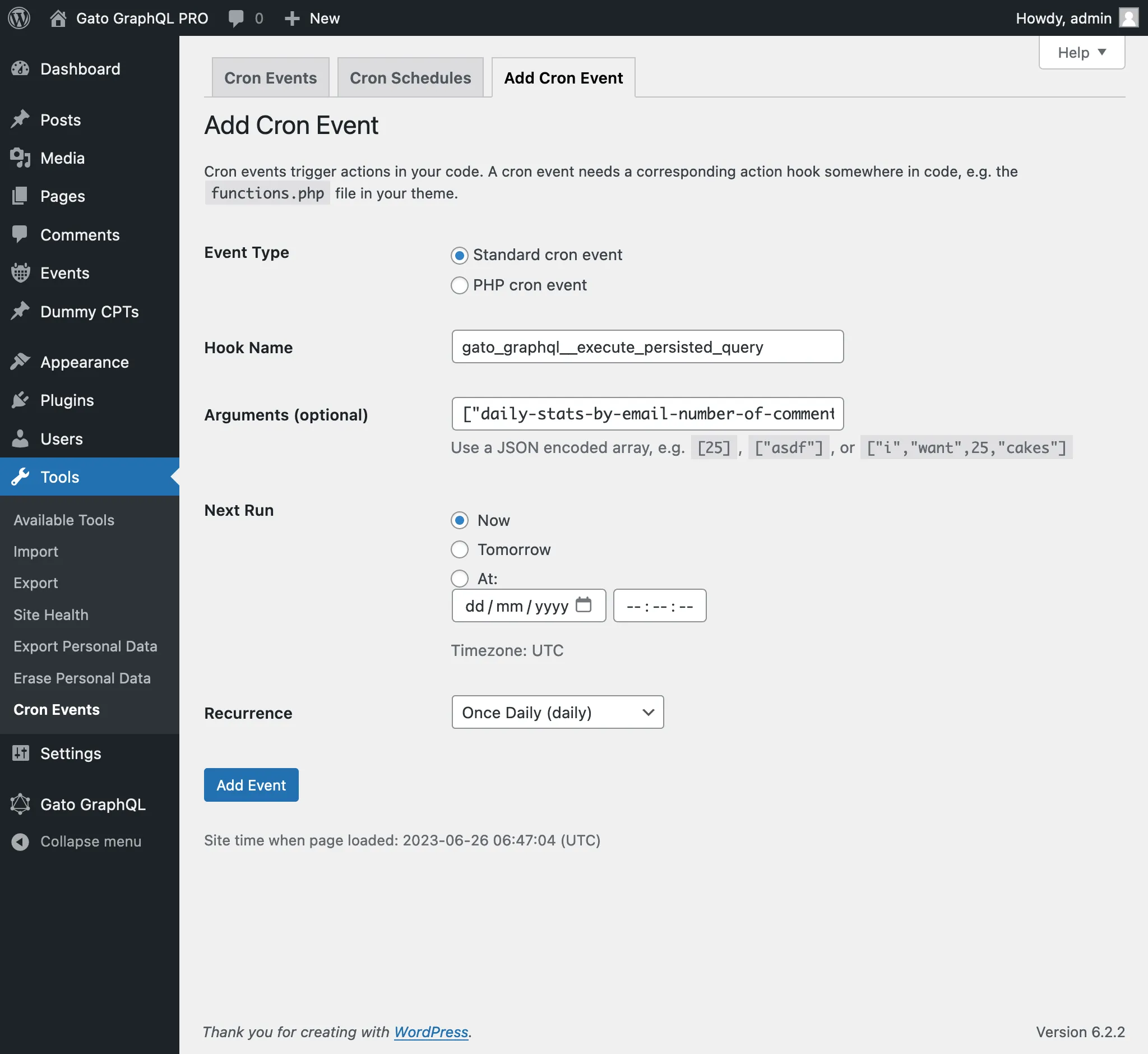
อาร์กิวเมนต์ตัวที่ 4 ที่ส่งไปยังอีเวนต์ WP-Cron คือ ID (เป็นจำนวนเต็ม) หรือชื่อผู้ใช้ (เป็นสตริง) ของผู้ใช้ที่ต้องล็อกอินอยู่ขณะที่รัน GraphQL query
(ในกรณีนี้ ค่า 1 คือ ID ของผู้ใช้ที่เป็นผู้ดูแลระบบ และสามารถระบุชื่อผู้ใช้ "admin" ได้เช่นกัน)
โดยปกติแล้วจำเป็นต้องส่งอาร์กิวเมนต์นี้เมื่อรัน mutation เนื่องจาก mutation ส่วนใหญ่ต้องการให้ผู้ใช้ (ที่มีสิทธิ์ที่เหมาะสม) ล็อกอินอยู่