สร้าง The SEO Framework metadata สำหรับ Bricks ด้วย Claude โดยอัตโนมัติ
ใช้ Claude สร้าง SEO Framework metadata โดยอัตโนมัติจากเนื้อหาในองค์ประกอบข้อความ Bricks






เราสามารถใช้ Claude ร่วมกับ Bricks extension เพื่อสร้าง metadata ของ The SEO Framework จากเนื้อหาในองค์ประกอบข้อความ Bricks ทั้งหมดด้วย Gato GraphQL queries เพียงรายการเดียว
และด้วย Automation extension เราสามารถทริกเกอร์การรัน queries นี้โดยอัตโนมัติเมื่อมีการเผยแพร่หน้า Bricks ใหม่
queries นี้ใช้ Claude วิเคราะห์เนื้อหาในองค์ประกอบข้อความ Bricks และสร้าง The SEO Framework metadata (ชื่อและคำอธิบาย) เพื่อปรับปรุง SEO
เราต้องระบุตัวแปรต่อไปนี้:
customPostId: ID ของ Bricks custom post ที่ต้องการอัปเดตanthropicAPIKey: API key สำหรับ Anthropic API
คุณสามารถปรับแต่ง system message และ prompt template เพื่อกำหนดวิธีที่ Claude สร้าง metadata
บันทึก queries นี้เป็น Persisted Query ใหม่ โดยใช้ชื่อว่า "Create The SEO Framework metadata for Bricks with Claude" เพื่อให้สามารถใช้งานใน Automation ได้ (ดูด้านล่าง)
ต่อไปนี้คือ GraphQL queries:
query InitializeGlobalVariables
@configureWarningsOnExportingDuplicateVariable(enabled: false)
{
emptyArray: _echo(value: [])
@export(as: "elementTexts")
@remove
}
query GetBricksData($customPostId: ID!)
@depends(on: "InitializeGlobalVariables")
{
customPost(by:{ id: $customPostId }, status: any) {
id
title
bricksData(filterBy: { include: ["heading", "text"] })
@underEachArrayItem
@underJSONObjectProperty(by: { path: "settings.text" })
@export(as: "elementTexts")
}
}
query GenerateMetadataWithClaude(
$anthropicAPIKey: String!
$maxTokens: Int! = 32000
$promptTemplate: String! = """
You are an SEO expert specializing in metadata optimization.
I need to generate SEO metadata for a WordPress page using The SEO Framework plugin.
Based on the following content from the page, please generate:
1. A compelling SEO title (max 60 chars)
2. A meta description (max 160 chars)
Please respond in JSON format with this structure:
{
"title": "SEO title here",
"description": "Meta description here"
}
Return ONLY the JSON object. Do not include any explanations, markdown formatting, or code blocks. The response must be a valid JSON object starting with { and ending with }.
Content to analyze:
{$encodedContent}
"""
$model: String! = "claude-sonnet-4-0"
)
@depends(on: "GetBricksData")
{
encodedContent: _arrayJoin(
array: $elementTexts,
separator: "\n\n"
)
prompt: _strReplace(
search: "{$encodedContent}",
replaceWith: $__encodedContent,
in: $promptTemplate
)
claudeResponse: _sendJSONObjectItemHTTPRequest(input: {
url: "https://api.anthropic.com/v1/messages",
method: POST,
options: {
headers: [
{
name: "x-api-key",
value: $anthropicAPIKey
},
{
name: "anthropic-version",
value: "2023-06-01"
}
],
json: {
model: $model,
max_tokens: $maxTokens,
messages: [
{
role: "user",
content: $__prompt
}
],
}
}
})
@underJSONObjectProperty(by: { key: "content" })
@underArrayItem(index: 0)
@underJSONObjectProperty(by: { key: "text" })
@export(as: "jsonEncodedMetadata")
}
query ExtractMetadata
@depends(on: "GenerateMetadataWithClaude")
{
jsonEncodedMetadata: _echo(value: $jsonEncodedMetadata)
@remove
decodedMetadata: _strDecodeJSONObject(string: $jsonEncodedMetadata)
seoMetadataTitle: _objectProperty(
object: $__decodedMetadata,
by: { key: "title" }
)
@export(as: "seoMetadataTitle")
seoMetadataDescription: _objectProperty(
object: $__decodedMetadata,
by: { key: "description" }
)
@export(as: "seoMetadataDescription")
}
mutation UpdateSEOFrameworkMetadata($customPostId: ID!)
@depends(on: "ExtractMetadata")
{
updateCustomPost(
input: {
id: $customPostId
meta: {
_genesis_title: [$seoMetadataTitle],
_genesis_description: [$seoMetadataDescription],
_open_graph_title: [$seoMetadataTitle],
_open_graph_description: [$seoMetadataDescription],
_twitter_title: [$seoMetadataTitle],
_twitter_description: [$seoMetadataDescription],
}
}
) {
status
errors {
__typename
...on ErrorPayload {
message
}
}
customPost {
id
metaTitle: metaValue(key: "_genesis_title")
metaDesc: metaValue(key: "_genesis_description")
socialTitle: metaValue(key: "_open_graph_title")
socialDesc: metaValue(key: "_open_graph_description")
twitterTitle: metaValue(key: "_twitter_title")
twitterDesc: metaValue(key: "_twitter_description")
}
}
}ตัวแปรจะมีลักษณะดังนี้:
{
"customPostId": 123,
"anthropicAPIKey": "sk-ant-..."
}Automation
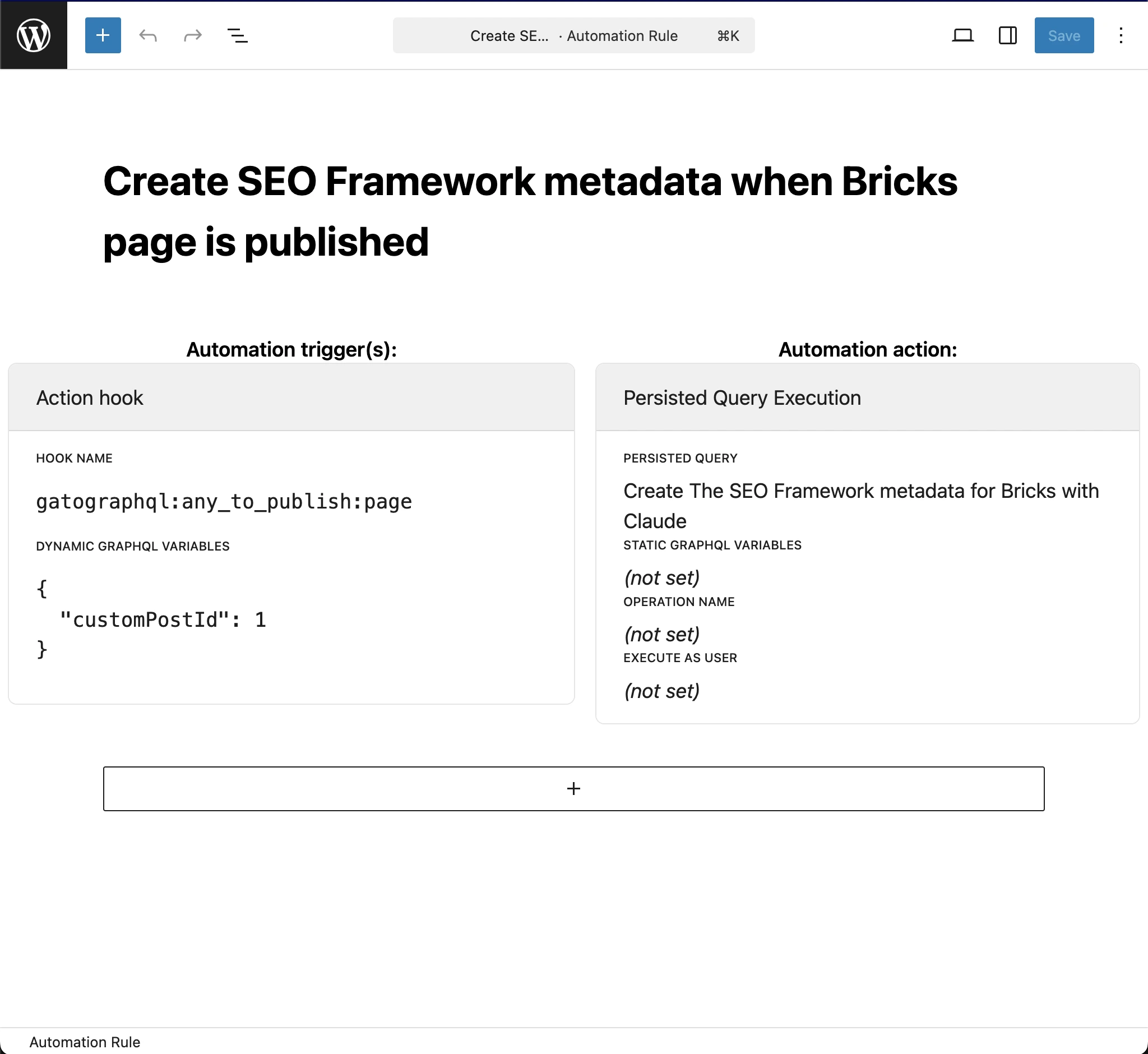
เพื่อให้ queries รันโดยอัตโนมัติเมื่อมีการเผยแพร่หน้า Bricks ใหม่ ให้สร้าง Automation rule ใหม่โดยใช้การตั้งค่าต่อไปนี้:
- Persisted Query:
"Create The SEO Framework metadata for Bricks with Claude"(นั่นคือรายการที่เราสร้างไว้ข้างต้น) - Hook name:
gatographql:any_to_publish:page - Dynamic GraphQL variables:
{
"customPostId": 1
}