


⭐️ เปิดตัว v5.0 พร้อม mutations ใหม่สำหรับกำหนด tags และ categories ให้กับ custom posts และการปรับปรุงอีกมากมาย

Gato GraphQL v5.0 ได้เปิดตัวแล้ว ดู release notes บน GitHub สำหรับรายการการเปลี่ยนแปลงทั้งหมด
ตั้งแต่เวอร์ชันนี้เป็นต้นไป เวอร์ชัน WordPress ขั้นต่ำถูกยกระดับเป็น v6.1
ด้านล่างคือการอัปเดตที่สำคัญที่สุด
การเปลี่ยนแปลงที่ทำให้เกิดความไม่เข้ากัน
- ยกระดับเวอร์ชัน WordPress ขั้นต่ำเป็น 6.1
ไม่คืนผลลัพธ์เมื่อกรองข้อมูลด้วย array ว่าง
GraphQL query นี้กรองโพสต์ตาม ID:
query FilterPostsByIDs(
$ids: [ID!]
) {
posts(filter: { ids: $ids }) {
title
}
}ก่อนหน้านี้ เมื่อส่ง array ว่างในตัวแปร $ids:
{
"ids": []
}...input filter.ids จะถูกละเว้น และ field จะคืนผลลัพธ์ทั้งหมด
ตอนนี้ การส่ง array ว่างหมายความว่า "ไม่ดึงผลลัพธ์ใดๆ"
หากต้องการละเว้น filter input ให้ส่ง null แทน
พฤติกรรมเดียวกันนี้ใช้กับ fields ทั้งหมดที่รับ input filter.ids:
categoriescommentscustomPoststagsusers- ฯลฯ
การปรับปรุง
- เพิ่ม field
isGutenbergEditorEnabled - รองรับ taxonomies เพิ่มเติมสำหรับ mutations บน post tags/categories (ไม่จำกัดแค่
post_tagและcategory) - เพิ่ม taxonomy field ให้กับ type
PostTagและPostCategoryด้วย - เพิ่ม field
featuredImageบนGenericCustomPost
เพิ่ม mutations สำหรับกำหนด custom tags/categories ให้กับ custom posts
ตอนนี้คุณสามารถ execute mutations เพื่อกำหนด tags และ categories บน custom posts ได้:
mutation SetTagsAndCategoriesOnCustomPost(
$customPostId: ID!
$tagIDs: [ID!]!
$categoryIDs: [ID!]!
$append: Boolean
) {
setTagsOnCustomPost(input: {
id: $customPostId
tagsBy: {
ids: $tagIDs
}
taxonomy: "some-tag-taxonomy"
append: $append
}) {
status
errors {
__typename
...on ErrorPayload {
message
}
}
customPost {
tags(taxonomy: "some-tag-taxonomy") {
id
}
tagNames(taxonomy: "some-tag-taxonomy")
}
}
setCategoriesOnCustomPost(input: {
id: $customPostId
categoriesBy: {
ids: $categoryIDs
}
taxonomy: "some-category-taxonomy"
append: $append
}) {
status
errors {
__typename
...on ErrorPayload {
message
}
}
customPost {
categories(taxonomy: "some-category-taxonomy") {
id
}
categoryNames(taxonomy: "some-category-taxonomy")
}
}
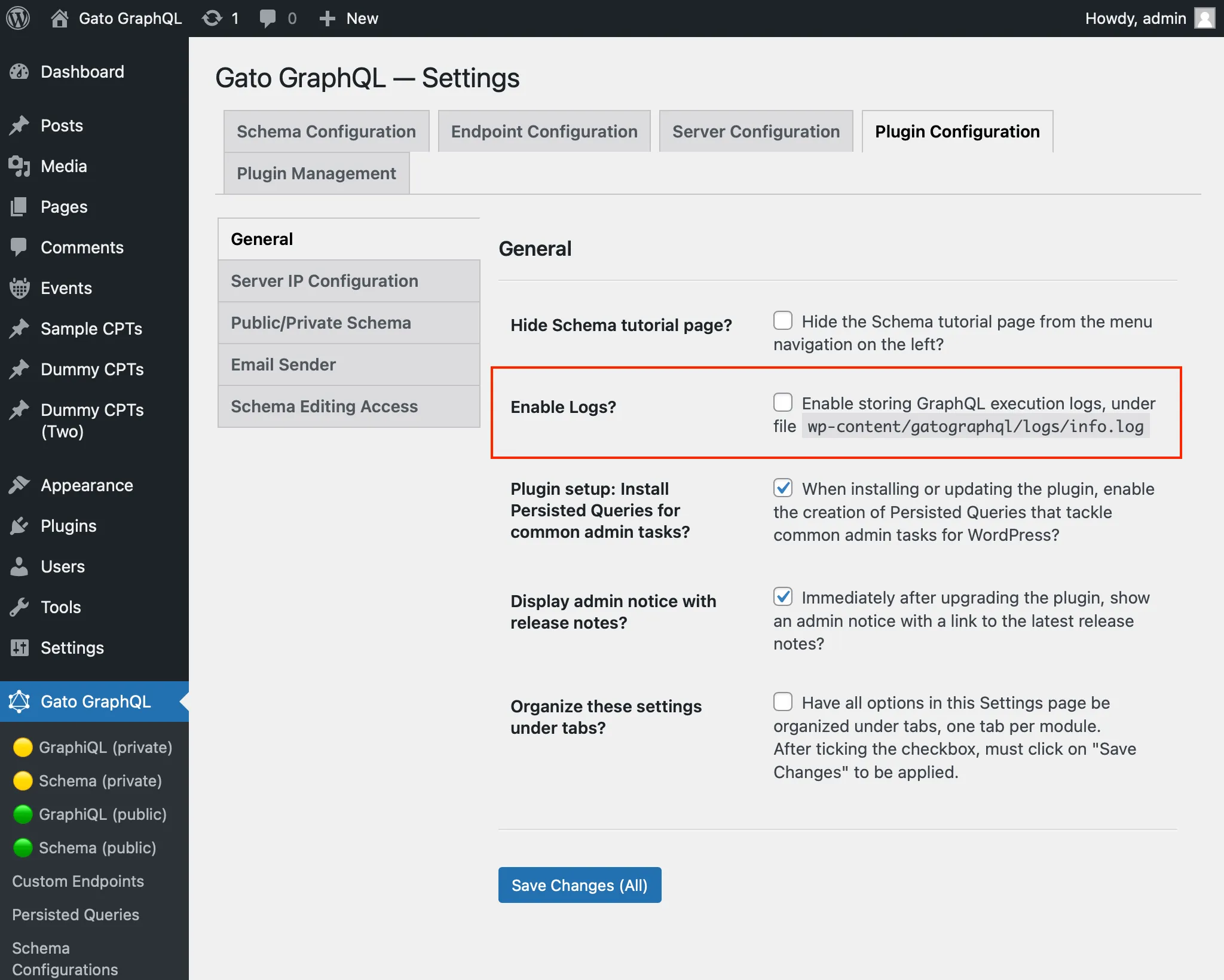
}เพิ่มตัวเลือกการตั้งค่าเพื่อเปิด/ปิดการบันทึก logs
GraphQL response ที่สมบูรณ์สำหรับรายการเฉพาะ (เช่น เมื่อทำ automation ใน PRO) สามารถบันทึกไว้ในไฟล์ wp-content/gatographql/logs/info.log
ตัวเลือกใหม่ Enable Logs? ใน Settings > Plugin Configuration > General ถูกเพิ่มเข้ามา เพื่อเปิดใช้งานการพิมพ์ logs เหล่านี้ (ค่าเริ่มต้นคือ false):
การยืนยันตัวตนด้วย Application password ล้มเหลว: แสดงข้อผิดพลาดใน GraphQL response
หากใช้ Application passwords เพื่อยืนยันตัวตนผู้ใช้กับ GraphQL endpoint และการยืนยันตัวตนล้มเหลว ข้อความแสดงข้อผิดพลาดจะปรากฏใน GraphQL response แล้ว:
{
"errors": [
{
"message": "Application Password authentication error: The provided password is an invalid application password."
}
],
"data": {
"me": null
}
}เพิ่ม persisted queries ที่กำหนดไว้ล่วงหน้า
มีการเพิ่ม persisted queries หลายรายการ:
- [PRO] นำเข้าโพสต์จาก WordPress RSS feed และเขียนเนื้อหาใหม่ด้วย ChatGPT
- [PRO] นำเข้าโพสต์ใหม่จาก WordPress RSS feed
- [PRO] นำเข้า HTML จาก URLs เป็นโพสต์ใหม่ใน WordPress
การแก้ไขข้อผิดพลาด
- บน fields
blocks,blockDataItems, และblockFlattenedDataItemsหลีกเลี่ยงข้อผิดพลาดเมื่อโพสต์ไม่มีเนื้อหา